Can McGraw Hill Connect detect switching tabs?
On a proctored exam, yes. On homework, quizzes and SmartBook, McGraw Hill documents no tab tracking.
- A proctored assignment shows a "Proctoring Enabled" label and a shield icon in your assignment list.
- There, Proctorio can lock the browser, record your screen and end the exam if you leave full screen.
- Without Proctorio, McGraw Hill does not document any tab or window log.
- In the Connect and SmartBook page code we read, we found no code that reports a tab switch.
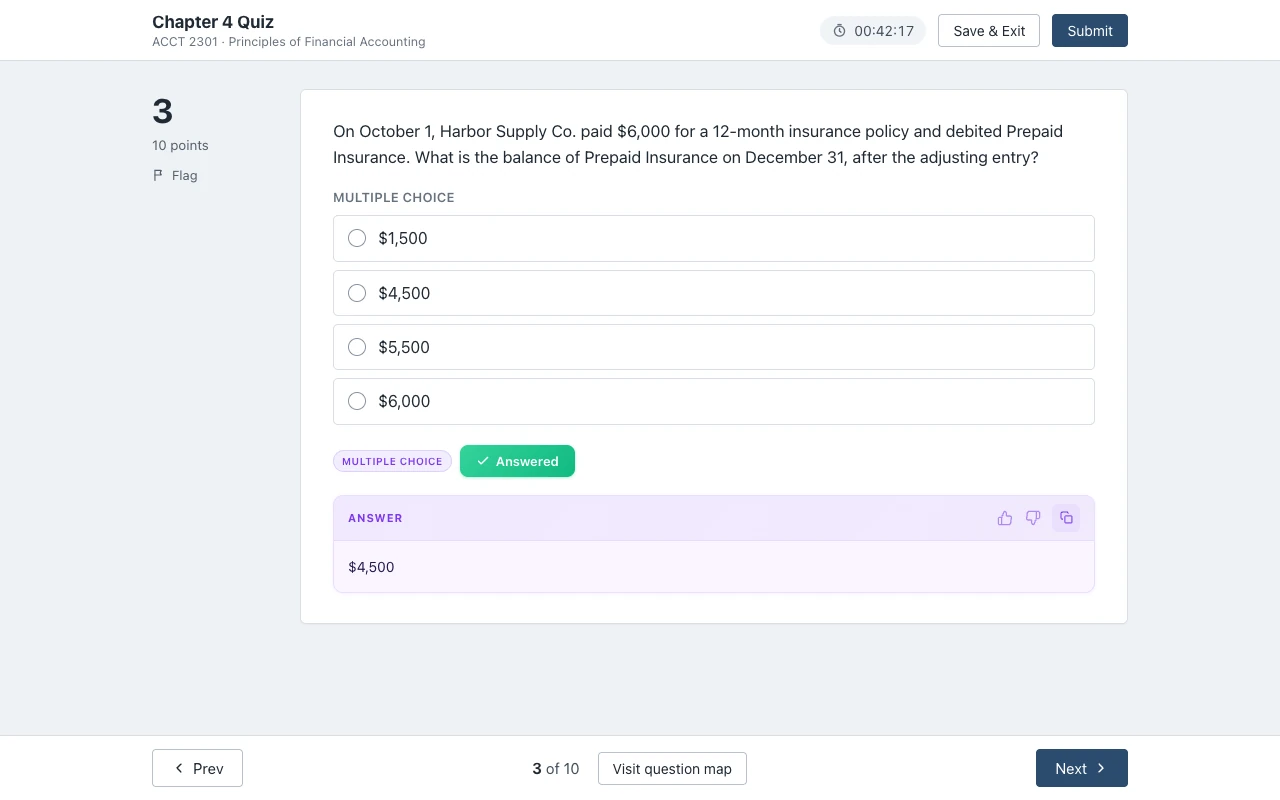
Our pickCanvas Quiz Solver shows the answer under the question, inside the McGraw Hill page. There is no second tab to switch to.
Add to Chrome - freeThe short answer
McGraw Hill can see you leave the page only when the assignment is proctored with Proctorio. McGraw Hill says it partners with Proctorio to provide remote proctoring and browser-locking capabilities within Connect. Its browser lock helps prevent students from opening other websites or applications, or navigating away during an exam.
Everything else is a normal Connect assignment, a quiz without proctoring, or SmartBook. For those, McGraw Hill does not document any record of tab switches. Its own blog lists what Connect uses against cheating: algorithmic content, question pooling and timed exams. Tab tracking is not on that list.
The fastest way to tell the two apart is the assignment list. McGraw Hill's Proctorio guide says a proctored assignment has the Proctoring Enabled label and a shield icon next to it.
Want the answer without leaving the assignment? Canvas Quiz Solver puts it under the question, in the same McGraw Hill tab. No second tab, no copying, no screenshots. You pick the answer and you submit.
On proctored exams
Yes, a Proctorio exam can see and stop tab switching, depending on the settings your instructor picked. McGraw Hill says Proctorio can verify identity, lock down the browser, record exam sessions and flag suspicious testing behavior for the instructor to review. It also says recording can cover webcam, microphone, screen activity and browser behavior, depending on the settings.
The student guide gives the details:
- You take the exam in Chrome or Edge with the Proctorio extension. The extension is only active while you take a proctored assignment.
- A "Before you Begin" page lists which activities are restricted and what is collected.
- If your instructor turned on record screen, you share your screen and see a "Proctorio is sharing your screen" message.
- With force full screen on, you cannot reach other applications during the exam.
- If you leave full screen, you get a warning. Then you have 30 seconds, 15 seconds or no time at all to close other windows or tabs before you are removed from the exam.
So on a proctored exam, plan on no other tabs at all. Canvas Quiz Solver does not run there either, by design. For more on the tool itself, read our Proctorio guide.
On homework, quizzes and SmartBook
McGraw Hill does not document any tab or window tracking on assignments without Proctorio. We found no McGraw Hill help page that says Connect or SmartBook records when you leave the page, and none that shows such a report to instructors.
We also read the public page code of both players. The main code file of the Connect question player has no listener for the browser event that fires when you switch tabs. Its only blur handler scrolls the page back to the top on tablets. The SmartBook main code file has one tab-visibility listener, and it only re-checks the page's own timers.
That is not proof of absence. Both pages load analytics tags too: Google Tag Manager on both, and Pendo on Connect. We cannot see what those tags are set to collect, and McGraw Hill does not document it. The code can also change after the date we checked.
What McGraw Hill does name for normal assignments is design, not tracking: algorithmic content, question pooling and timed exams. Your numbers can differ from a classmate's, and a time limit leaves little room for a second tab.
What Reddit says
Reddit asks this question again and again, and the threads are opinions, not McGraw Hill facts. The thread that ranks highest is "Can McGraw Hill detect you leaving the window?" on r/Advice. Google also shows threads titled "Can McGraw Connect tell if I'm switching tabs" and "Can McGraw Hill catch cheating?".
The replies swap stories about one class or one instructor. Read them as stories. The only clear line McGraw Hill draws is the one above: Proctoring Enabled means Proctorio settings are on, and its browser lock and recording apply. If the label is not there, McGraw Hill documents no tab tracking.
Get the answer without leaving the page
The simplest way to never switch tabs is to have the answer in the tab you are already in.
Canvas Quiz Solver is a Chrome extension that shows the answer inside the McGraw Hill page, right under the question. In SmartBook it sits above the High, Medium and Low confidence buttons. You stay in the same tab, so there is no second tab, no copied question and no screenshot. You read the answer, you pick it, and you submit. It never fills in, clicks or submits anything for you.
McGraw Hill support is in beta. It works on Connect assignments and quizzes in the question player and on SmartBook: multiple choice, true or false, check all that apply, fill in the blank, numeric, matching, ranking and ordering, plus short answer and essay on Connect. Connect worksheets, the accounting tool, external tools, surveys and uploads are not supported yet, and it says so on the question. Answers come from AI and can be wrong, so check the ones that count. It uses the same account and plan as on Canvas.
The first time, open the assignment, click the extension icon and tap "Keep it on for this site". Chrome asks once, and after that it is on for every assignment there.
It does not run on proctored exams. On a Proctorio exam the popup says "Not available on proctored exams." and nothing shows on the page.
Sources we checked
Every fact about what McGraw Hill sees comes from McGraw Hill's own pages or its own public page code. We checked each one on 2026-10-21.
- Remote Proctoring & Browser Locking for Online Testing (McGraw Hill)
- McGraw Hill Connect + Proctorio Student User Guide (McGraw Hill, PDF)
- Tips to Promote Academic Integrity in Your Course (McGraw Hill blog, June 2024)
- Connect question player page and its main code file (McGraw Hill, ezto.mheducation.com)
- SmartBook main code file (McGraw Hill, learning.mheducation.com)
- Can McGraw Hill detect you leaving the window? (Reddit r/Advice, student opinions, not documentation)
Common questions
Can McGraw Hill detect switching tabs if not proctored?
McGraw Hill does not document any tab tracking on assignments without Proctorio. We found no help page that describes a tab or window log, and the main player code we read has no code that reports a tab switch. Proctored exams are different.
Are McGraw Hill exams monitored?
Only when the instructor turns on proctoring. Connect uses Proctorio, and the assignment list shows a Proctoring Enabled label and a shield icon. Depending on the settings, Proctorio can verify your ID, lock the browser and record webcam, microphone and screen.
Can McGraw Hill detect copy and paste on homework?
McGraw Hill does not document a copy and paste log on homework. It blocks some copying instead: the Connect quiz page turns off the right-click menu, and the SmartBook question text blocks cut, copy and paste. Our copy and paste guide has the details.
How do I know if a Connect assignment is proctored?
Look at the assignment list. McGraw Hill says a proctored assignment has a Proctoring Enabled label in its name and a shield icon next to it. It also asks you to install the Proctorio extension and go through pre-check steps before you start.
Does the Proctorio extension watch my homework?
McGraw Hill says no. Its Proctorio guide says the extension is only active while you take a proctored assignment and is off the rest of the time. The shield icon turns green when it is active and gray when it is off.
Can teachers see if you switch tabs on Blackboard?
That depends on Blackboard and any proctoring tool your school uses, not on McGraw Hill. This guide covers McGraw Hill only. For how a learning platform quiz log records focus, see our Canvas tab switching guide.
The answer in your McGraw Hill tab, not in a second one
Canvas Quiz Solver shows the answer under the question on Connect and SmartBook. You pick it, you submit it, and you never leave the page.