Does McGraw Hill Connect record you during a quiz or exam?
Connect itself does not record you. Recording happens only on a "Proctoring Enabled" exam, through Proctorio, and only with the settings your instructor turns on.
- Homework, quizzes and SmartBook without the label: McGraw Hill documents scores and time, not your camera or screen.
- The free Basic Proctorio package can record webcam video and lock the browser.
- The paid Plus package adds audio, screen, web traffic, room scans and ID checks.
- You would know: Chrome asks before the camera turns on, and you click Share before your screen is recorded.
- McGraw Hill names LockDown Browser for ALEKS, not Connect, and does not name Honorlock at all.
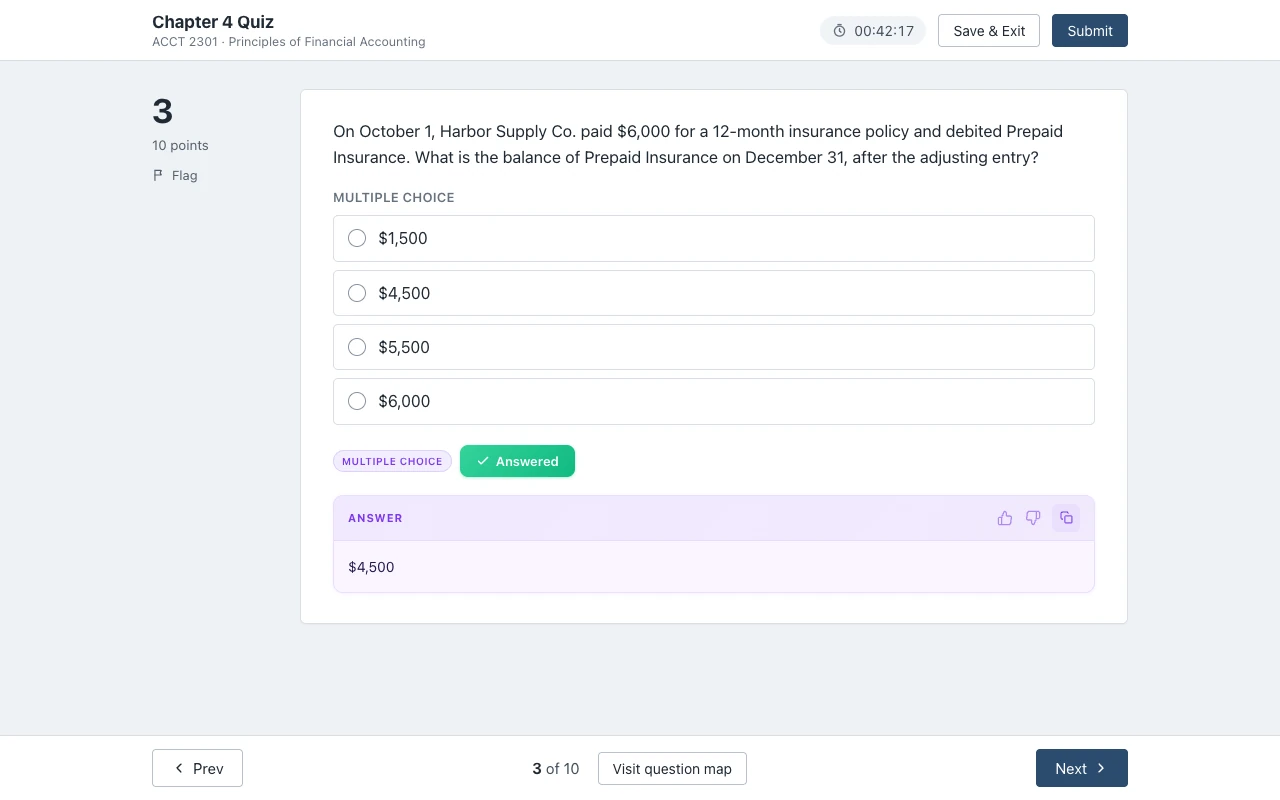
Our pickCanvas Quiz Solver shows the answer under each Connect question on the assignments without proctoring, in the same tab. It turns itself off on proctored exams and gets around nothing.
Short answer
McGraw Hill documents recording in one place only: Proctorio, its proctoring partner, on assignments marked "Proctoring Enabled". Its remote proctoring page answers the question in two words, "It can", and then adds: "Recording depends on the Proctorio settings chosen by the instructor or institution."
So there are three answers, one for each kind of work. On normal homework, quizzes and SmartBook, nothing records you. On a proctored exam with the free package, your webcam can be recorded. On a proctored exam with the paid package, your microphone, screen and the web pages you visit can be recorded too.
Homework, quizzes and SmartBook: no recording
On an assignment without the "Proctoring Enabled" label, Proctorio is not running. McGraw Hill's Proctorio syllabus text says "Proctorio does not continuously run in Connect" and only runs during a proctored assignment. The student guide adds that the Proctorio extension is gray when it is off and green when it is on.
What Connect does keep for every assignment is the gradebook. McGraw Hill's Connect reports guide lists your score, when you started and finished, how many attempts you made and the total time spent. Its SmartBook reports guide adds the time you spent on questions and the confidence you picked. That is a record of results and time, not a video of you.
Your camera and microphone are also protected by Chrome itself. A web page cannot turn them on until you allow it, and it cannot see your screen unless you pick a screen and click Share. Chrome also shows a recording mark on the tab while a page uses your camera or microphone.
Proctorio on Connect: what it can record
McGraw Hill sells Proctorio in two packages. Its Proctorio on Connect page says the Basic package comes standard with Connect at "no extra cost", and a Plus package "can be added to the purchase of Connect". The table below is McGraw Hill's comparison of packages, cut to the settings that record or check you.
| Setting | What McGraw Hill says it does | Basic (free) | Plus ($17.50) |
|---|---|---|---|
| Record video | Records video from your webcam | Yes | Yes |
| Record audio | Records audio from your microphone | No | Yes |
| Record screen | Records your screen | No | Yes |
| Record web traffic | Records the web pages you visit | No | Yes |
| Desk scan | Records your test-taking room, at the start or at random times | No | Yes |
| ID verification | Your ID card is "automatically captured and stored" | No | Yes |
| Browser locks | Other tabs and apps, a second monitor, copy and paste, right-click, printing, downloads, other extensions | Yes | Yes |
| AI and phone flags | Flags "potential audio and web AI use and mobile usage" | No | Yes |
Three details matter for your privacy. First, "Yes" means the instructor can turn a setting on, not that it is on: the settings checklist McGraw Hill gives instructors is a list to pick from. Second, the syllabus text says Proctorio "may include recording of video, audio, and screen activity or none of the above". Third, the same text says only your instructor "or approved individuals" at your school can see your exam data.
The pre-check tells you what is on. The Before you Begin page lists "what information will be collected", screen recording asks you to click Share, and the camera needs your Allow click. After the exam you may remove the Proctorio extension, as McGraw Hill's syllabus text says, and add it again before the next proctored exam.
Does McGraw Hill use LockDown Browser or Honorlock?
LockDown Browser: McGraw Hill names Respondus LockDown Browser for ALEKS, its math and chemistry platform, not for Connect. Its ALEKS and Respondus FAQ says LockDown Browser stops you "accessing other applications, copying, printing, or visiting other websites", and that the companion Respondus Monitor "uses webcam and video technology to record students". ALEKS needs its own version of LockDown Browser, installed by the student.
On Connect, McGraw Hill documents browser locking through Proctorio instead. Its remote proctoring page says "Proctorio settings within Connect" support browser locking. So when a Connect exam is locked down, you take it in Chrome or Edge with the Proctorio extension, not in a separate LockDown Browser app. For LockDown Browser on Canvas, see does LockDown Browser record you?
Honorlock: McGraw Hill's proctoring pages do not mention Honorlock. Some schools still use it on publisher sites through what Honorlock calls a Universal Exam. You launch Honorlock in your LMS first, allow your webcam and microphone, take a face photo and an ID photo, scan your workspace, then share your screen. Only then do you open the publisher site. The Honorlock guide does not name McGraw Hill, so check your syllabus. More in our Honorlock guide.
How to tell before you start
Every documented recording route starts with something you have to do. Use this list before any Connect exam:
- The label. A "Proctoring Enabled" tag in the assignment name and a shield icon at the right of the row mean Proctorio.
- The pop-up. After Begin, a proctored exam asks for Chrome or Edge and the Proctorio extension.
- The prompts. Camera and microphone need an Allow click. Screen recording needs Share.
- Your LMS. Honorlock and LockDown Browser are started outside Connect, so you would have launched them on purpose.
If none of these happened, McGraw Hill documents no recording for that assignment. For the label and every pre-check step, read what Proctoring Enabled means.
Where Canvas Quiz Solver runs
Canvas Quiz Solver works on the Connect work that nothing records: assignments and quizzes without proctoring, and SmartBook, in beta. It shows the answer right under the question, in the same tab. It reads the question text on the page, so it takes no screenshot and opens no second tab. You read the answer, pick it yourself and submit.
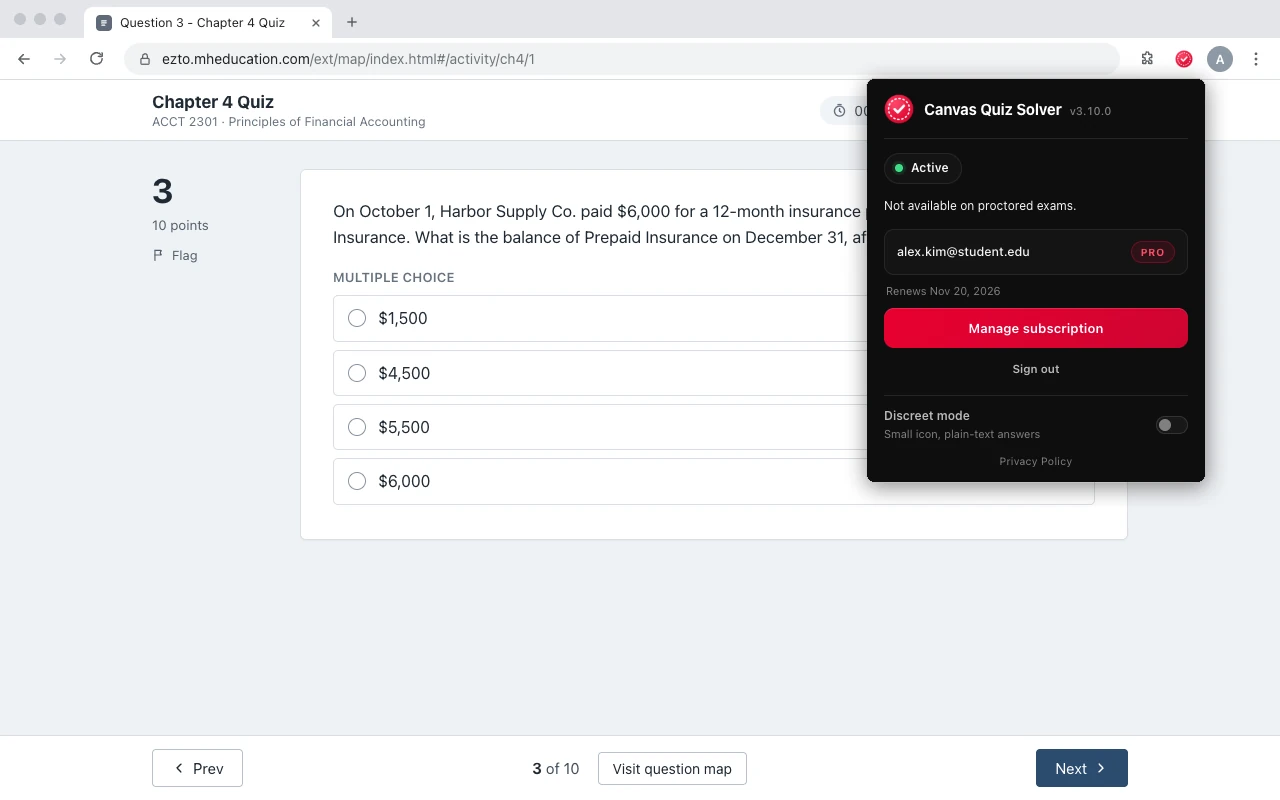
Setup is one step: open an assignment, click the extension icon and tap "Keep it on for this site". It is the same account and plan as on Canvas. Answers come from AI and can be wrong, so check them against your reading.
On a proctored exam it stays off. When it sees a proctoring tool such as Proctorio on the page, the popup says "Not available on proctored exams." and the page gets nothing from it. It does not hide from Proctorio or Honorlock, and it gets around no setting.
Sources we checked
- Remote Proctoring and Browser Locking for Online Testing (McGraw Hill), checked 2026-10-21
- Proctorio on Connect (McGraw Hill), checked 2026-10-21
- Proctorio in Connect: Comparison of Packages (McGraw Hill), checked 2026-10-21
- Proctorio Settings Checklist (McGraw Hill, PDF), checked 2026-10-21
- Connect Proctorio Syllabus Description (McGraw Hill), checked 2026-10-21
- McGraw Hill Connect + Proctorio Student User Guide (McGraw Hill, PDF, March 2026), checked 2026-10-21
- Connect Reports: Assignment Results, Student Performance, At-Risk Students (McGraw Hill, PDF, August 2026), checked 2026-10-21
- SmartBook Reports in Connect (McGraw Hill, PDF, August 2026), checked 2026-10-21
- ALEKS and Respondus FAQs (McGraw Hill, PDF), checked 2026-10-21
- How to Use Honorlock with a Universal Exam (Test Takers) (Honorlock, updated 2026-08-18), checked 2026-10-21
Common questions
Does McGraw Hill record your screen?
Only on a Proctoring Enabled exam with the record screen setting on, which is in the paid Plus package. You pick a screen and click Share first. Homework without the label is not recorded.
Does McGraw Hill Connect use your camera?
Only through Proctorio on a proctored exam, if the instructor turns on record video. Chrome asks you to allow the camera first. Connect homework does not use your camera.
Does McGraw Hill have a lockdown browser?
For Connect, McGraw Hill documents browser locking through Proctorio in Chrome or Edge. It names Respondus LockDown Browser for ALEKS, not for Connect.
Does McGraw Hill use Honorlock?
McGraw Hill does not mention Honorlock. Some schools use Honorlock on publisher sites through a Universal Exam started in the LMS, so check your syllabus.
Does Proctorio record you on every Connect assignment?
No. McGraw Hill says Proctorio only runs while you take a proctored Connect assignment, and those carry the Proctoring Enabled label.
Who can watch my Proctorio recording?
McGraw Hill's syllabus text says only your instructor or approved people at your school can see your exam data, and the instructor decides on any integrity question.
Does Canvas Quiz Solver work on recorded exams?
No. It turns itself off on proctored exams and gets around nothing. It is for Connect assignments and quizzes without proctoring, and SmartBook.
Answers on the Connect work nothing records
The answer shows under the question you are on. You pick it, you submit it. Start free.