What "Proctoring Enabled" means on McGraw Hill Connect (and Canvas)
"Proctoring Enabled" means your instructor turned on Proctorio for that one Connect assignment. An assignment without the label does not run Proctorio.
- The label sits in the assignment name, with a shield icon at the right of the row.
- You need Chrome or Edge on a computer and the Proctorio extension. Phones and iPads cannot take it.
- A pre-check runs before the exam, and it does not count against your time.
- What it records depends on the settings: webcam video in the free package, plus audio, screen, web traffic and room scans in the paid one.
- The label is per assignment. Homework in the same course can have no proctoring at all.
Our pickFor the assignments without the label, Canvas Quiz Solver shows the answer under each Connect question, in the same tab. On a Proctoring Enabled exam it turns itself off. It gets around nothing, and you pick every answer yourself.
Short answer
"Proctoring Enabled" is the label Connect puts on an assignment when the instructor switches on Proctorio, the remote proctoring tool McGraw Hill partners with. McGraw Hill's remote proctoring page says it means the assignment "has Proctorio settings turned on to monitor or restrict testing activity".
It does not mean one fixed set of rules. The instructor picks the settings for each assignment. One exam may only lock the browser, and the next may record your webcam, microphone and screen. McGraw Hill's syllabus text for instructors says it plainly: "The settings that I use may vary depending on the assignment."
It also does not mean every assignment in the course is watched. The label is on the assignment, not the course. Your homework, quizzes and SmartBook readings in the same class show no label and run no Proctorio.
Where you see Proctoring Enabled
You see it on your Connect assignment list, before you open anything. The Connect and Proctorio student guide says proctored assignments show the "Proctoring Enabled" label in the assignment name and a shield icon at the right of the listing. You start the assignment with the blue launch arrow, the same as any other assignment.
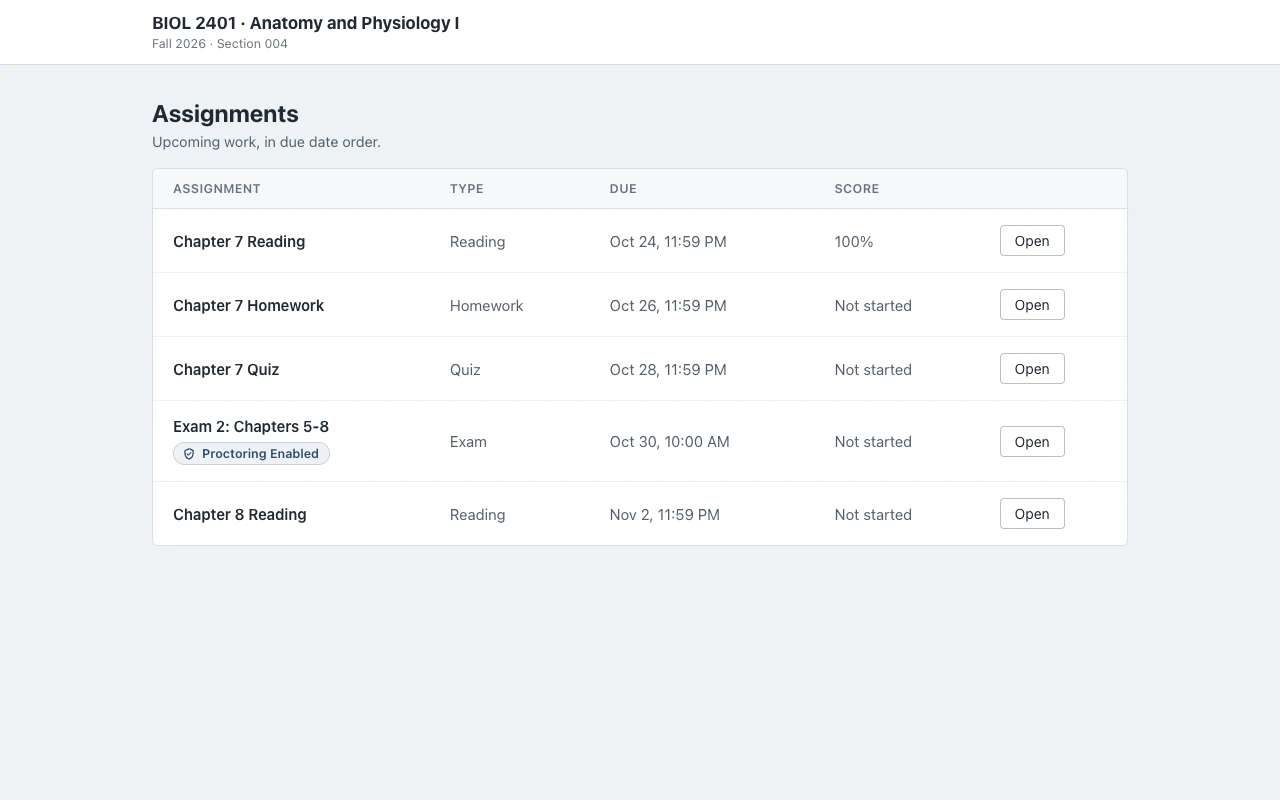
Three things help you read the list:
- The label is in the title. McGraw Hill's syllabus text says proctored assignments "will be clearly labeled with 'Proctoring Enabled' in the assignment title".
- The settings show when you start. The same text says "the settings in use will be indicated" when you open the assignment, so you see what is on before the exam begins.
- No label, no Proctorio. McGraw Hill says Proctorio "only runs while you are taking your proctored Connect assignment", and the extension is gray when it is off.
What happens when you start a proctored Connect exam
A proctored exam has a set of checks before the first question. The student guide says to allow extra time for them, and that "the pre-check does NOT count against your assignment time". This is the order the guide gives, step by step:
- Begin. Click the launch arrow, read the assignment details and click Begin.
- Browser reminder. A pop-up says to use Chrome or Edge. It links the Proctorio extension and says you may need a webcam, a microphone or a way to pay, depending on the settings.
- The extension. If you do not have the Proctorio extension yet, you add it now. The guide says it takes about 30 seconds and you do it once. Its shield icon turns green while it is active.
- Before you Begin page. This page shows "which activities will be restricted and what information will be collected". Read it: it is the list of settings for this exam.
- System check. Proctorio tests your connection. If the settings need them, Chrome asks to allow your camera and microphone.
- Screen share. Only if the instructor turned on record screen: you pick the screen with the exam and click Share. Without that setting, the guide says "you will not see this prompt".
- ID and camera checks. If required, you hold a photo ID up to the webcam, and a camera test takes five pictures of your face.
- Course fee. Some courses ask for a one-time proctoring fee. You pay once, and the guide says you never see that screen again in the course.
- Exam agreement. You read the agreement and click "I accept, begin exam now". Some instructors also ask for a signature.
- Desk scan. If it is on, you turn your webcam or laptop to show the room, at the start or at random times during the exam.
- Quiz Tools. A small window opens in the player. It can show your recording, a calculator or a whiteboard. A timed exam starts its clock here.
- Full screen. If force full screen is on, you cannot use other apps. If you leave, you get 30 seconds, 15 seconds or no time at all before the exam ends, depending on the setting.
- Submit and exit. You submit as usual. When you click Exit, the proctoring session ends too.
McGraw Hill's syllabus text also tells instructors to point students to a practice quiz first. If your course has one, take it: it shows you every prompt above before the real exam.
What Proctorio can record on Connect
McGraw Hill's Proctorio on Connect page lists five recording options: webcam video, microphone audio, your screen, "the web pages the student visits", and a desk scan of your room. Your instructor turns each one on or off. McGraw Hill's remote proctoring page sums it up: "Some exams may record webcam, microphone, screen activity, browser behavior, or student ID verification."
Next to recording, the same page lists the lock settings. Proctorio can control "whether students can access other tabs or programs", stop a second monitor, block copy, cut and paste, right-click, printing and downloads, and turn off "other browser extensions".
Which options exist depends on the package your school or instructor uses. The free Basic package that comes with Connect includes webcam video, the browser locks and the integrity agreement. The Plus package, listed at $17.50 in McGraw Hill's comparison of packages, adds audio, screen and web traffic recording, desk scans, ID checks, and flags for possible AI use and phone use.
The full side-by-side of both packages, and what each one means for your camera and screen, is in does McGraw Hill record you?
Proctoring Enabled on Canvas, Blackboard and D2L
Many courses open Connect from the school's LMS. McGraw Hill's LMS integration page lists Blackboard, Brightspace (D2L), Canvas and Moodle, with single sign-on, assignment-level links and grade sync. In Canvas, McGraw Hill's Canvas setup guide says Connect adds each deployed assignment to the course Assignments area and to a module link.
So the assignment you click in Canvas is a link into Connect. The proctoring belongs to Connect: the Chrome or Edge pop-up, the Before you Begin page and the Proctorio checks all run after the Connect player opens. McGraw Hill does not document whether your LMS list repeats the "Proctoring Enabled" words. The sure sign is the Connect pre-check: if Connect asks for the Proctorio extension before the first question, the exam is proctored.
A Canvas quiz that is not a Connect assignment is a different case. Schools proctor those with their own tools, such as Proctorio, Honorlock or Respondus LockDown Browser, set up in Canvas. Our guides on Proctorio, Honorlock and LockDown Browser cover those.
Assignments without the label
A Connect assignment without the label runs no Proctorio, and McGraw Hill's Proctorio guides speak of Connect assignments, not SmartBook. On those, McGraw Hill documents no recording. What it does document is the gradebook: McGraw Hill's Connect reports guide lists your score, start and finish times, attempts and total time spent.
This is where Canvas Quiz Solver is made to help. It reads the question on the Connect page and shows the answer right under it, in the same tab. No second tab, no screenshot, no copy and paste into a chatbot. You read the answer, pick it yourself and submit. It works on Connect assignments and quizzes and on SmartBook, in beta.

Setup takes one step. Open an assignment, click the extension icon and tap "Keep it on for this site". Chrome asks once, and then it is on for every assignment there. It is the same account and plan as on Canvas. Answers come from AI and can be wrong, so check them against your reading.
With the label
On a Proctoring Enabled exam, Canvas Quiz Solver turns itself off. When it sees a proctoring tool such as Proctorio on the page, the popup says "Not available on proctored exams." and nothing shows on the page. It does not hide from Proctorio, and it does not get around any setting. Proctorio also has its own setting that turns other browser extensions off.
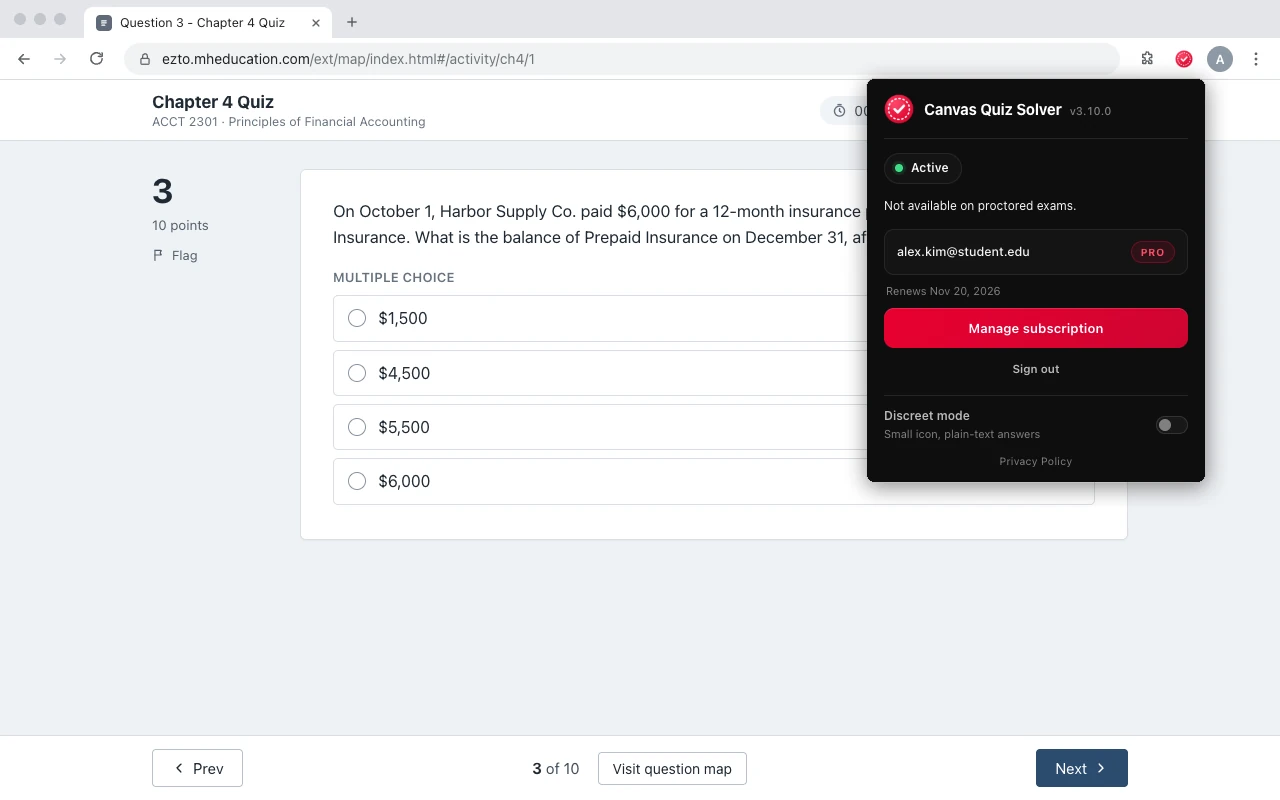
So the honest plan is simple. Use it on the homework and quizzes without the label. On the exam with the label, study, take it the normal way, and follow your instructor's rules.
Sources we checked
- Remote Proctoring and Browser Locking for Online Testing (McGraw Hill), checked 2026-10-21
- Proctorio on Connect (McGraw Hill), checked 2026-10-21
- Proctorio in Connect: Comparison of Packages (McGraw Hill), checked 2026-10-21
- McGraw Hill Connect + Proctorio Student User Guide (McGraw Hill, PDF, March 2026), checked 2026-10-21
- Connect Proctorio Syllabus Description (McGraw Hill), checked 2026-10-21
- Connect Reports: Assignment Results, Student Performance, At-Risk Students (McGraw Hill, PDF, August 2026), checked 2026-10-21
- Learning Management System Integration (McGraw Hill), checked 2026-10-21
- Integrating McGraw Hill Connect New UX (LTIA) with Canvas (McGraw Hill, PDF), checked 2026-10-21
Common questions
What does proctoring enabled mean on McGraw Hill?
It means the instructor turned on Proctorio for that assignment. Depending on the settings, you may need Chrome or Edge with the Proctorio extension, a webcam, an ID check, a screen share or full screen.
Does Proctoring Enabled mean I am being recorded?
Not always. Recording depends on the settings the instructor picks. The Before you Begin page lists what will be collected, and screen recording needs you to click Share first.
How do I know if my McGraw Hill exam is proctored?
Look for the Proctoring Enabled label in the assignment name and the shield icon beside it. When you click Begin, a pop-up about Chrome or Edge and the Proctorio extension also tells you.
Is every assignment in my course proctored if one is?
No. The label is set per assignment. Homework, quizzes and SmartBook in the same course can have no proctoring at all.
Can I take a Proctoring Enabled exam on my phone or iPad?
No. McGraw Hill says proctored assignments need the latest Chrome or Edge on a computer, Chromebook or Surface tablet. iPhones, iPads and Android phones are not supported.
Does the pre-check use up my exam time?
No. McGraw Hill says the pre-check does not count against your assignment time, and a timed exam starts its clock after the checks.
Does Canvas Quiz Solver work on Proctoring Enabled exams?
No. It turns itself off on proctored exams and gets around nothing. It is for Connect assignments and quizzes without proctoring, and SmartBook.
Answers on the Connect work without the label
The answer shows under the question you are on. You pick it, you submit it. Start free.