Using McGraw Hill Connect through Canvas
Your instructor links Connect to the Canvas course once. After that, each Connect assignment is a link in Canvas, and your Connect score flows back to the Canvas gradebook.
- McGraw Hill connects to Canvas through LTI Advantage: single sign-on, links to each assignment and grade sync.
- The first time, you sign in or create a Connect account from Canvas and register for the course.
- Your instructor picks whether your best, last or average attempt goes to Canvas.
- Anything you do not submit can show up in Canvas as a 0 after the due date.
Our pickOne extension and one plan cover both sides: Canvas Quiz Solver shows answers on your Canvas quizzes, and on the Connect assignments your Canvas course links to (beta). You pick the answer yourself.
How Connect opens from Canvas
Connect and Canvas have worked together since 2016. McGraw Hill's announcement at the time described single sign-on, automatic grade sync, and moving between Canvas modules and Connect assignments. Today the link runs on LTI Advantage. McGraw Hill's LMS integration page lists single sign-on, assignment-level linking, gradebook sync and automatic account creation for new users.
Your instructor does the setup. McGraw Hill's Canvas integration guide has them pair the Canvas course with a Connect course, then deploy assignments. Each deployed assignment lands in the Canvas Assignments list with a matching module link, and graded ones get their own Canvas grade column. Some instructors also add a Connect link to the course menu, which opens your Connect section home (tool link guide).
Your side, the first time:
- Open the Connect link in your Canvas course and click Begin.
- Sign in or create a Connect account. If you already have a Connect account under another email, sign in with it instead of making a new one.
- Register for the course. McGraw Hill's student registration guide for an LMS lists three ways: an access code, a card payment, or 14 days of courtesy access, which McGraw Hill suggests if you are waiting on financial aid (registration guide). Some schools include Connect in your course materials, so you may already have access.
After that, every Connect assignment in Canvas opens in McGraw Hill's own question player: Connect assignments on ezto.mheducation.com and SmartBook on learning.mheducation.com. That detail matters for the last section of this guide.
Grades not syncing
When a Connect grade looks wrong in Canvas, check these five documented rules first:
- You did not submit. McGraw Hill says unsubmitted assignments show no score in Connect, and with LTI Advantage a 0 goes to Canvas after the due date (incomplete assignments). Save and Exit is not Submit.
- Late work or an exception. If late work is allowed or you got an exception, the 0 is sent after that later date instead.
- Best, last or average. The instructor picks which attempt goes to Canvas, so the Canvas score can differ from the attempt you are looking at (deploy guide).
- Held feedback. Your score can be hidden in Connect and still be in Canvas: the policy settings guide says the total score still transfers.
- Ungraded assignments. Connect makes no Canvas grade column for an ungraded assignment.
If none of these fit, ask your instructor to re-sync. The LMS integration page lists re-sync for one student or one assignment. McGraw Hill also says it does not remove a 0 that was already sent. McGraw Hill support is at (800) 331-5094. More on scores in our guide to how Connect grades your work.
Blackboard, D2L and Moodle
Canvas is not the only option. McGraw Hill's LMS page names Blackboard Learn, D2L Brightspace, Canvas and Moodle, and its LMS onboarding page also lists resources for Sakai and eCollege. The student steps are the same idea everywhere: a Connect link in the course, Begin, sign in or register, and grades that sync back.
Blackboard had one deadline: McGraw Hill says its older Blackboard connection shut down on June 30, 2024, and instructors had to move to LTI Advantage. For other systems, McGraw Hill says the older connection keeps working until further notice.
Whatever system links to Connect, the assignment opens in the same McGraw Hill player, so Canvas Quiz Solver works there the same way. On the LMS side, it covers Canvas quizzes only. Quizzes built in Blackboard, D2L or Moodle are not supported.
One extension for Canvas quizzes and Connect
If your course runs on Canvas and Connect, you deal with two kinds of questions: the quizzes built in Canvas and the Connect assignments your modules link to. Canvas Quiz Solver covers both with one install, one account and one plan.
- On Canvas: the answer shows under each quiz question, in the same tab.
- On Connect and SmartBook (beta): open an assignment, click the extension icon and tap "Keep it on for this site". Chrome asks once for that site, and then it is on for every assignment there.
- Connect question types: multiple choice, true or false, yes or no, check all that apply, fill in the blank, numeric, matching, ranking, short answer and essay.
- Not supported yet: accounting worksheets and the accounting tool, external tools such as virtual labs, SIMnet and ALEKS, file uploads, image labeling and hotspot questions, and the older Connect player.
- You stay in control. It never clicks, types or submits, and it turns itself off on proctored exams.
Answers come from AI and can be wrong, so check them. You get free answers to try, and Unlimited is $14.99 a month for Canvas and McGraw Hill together.
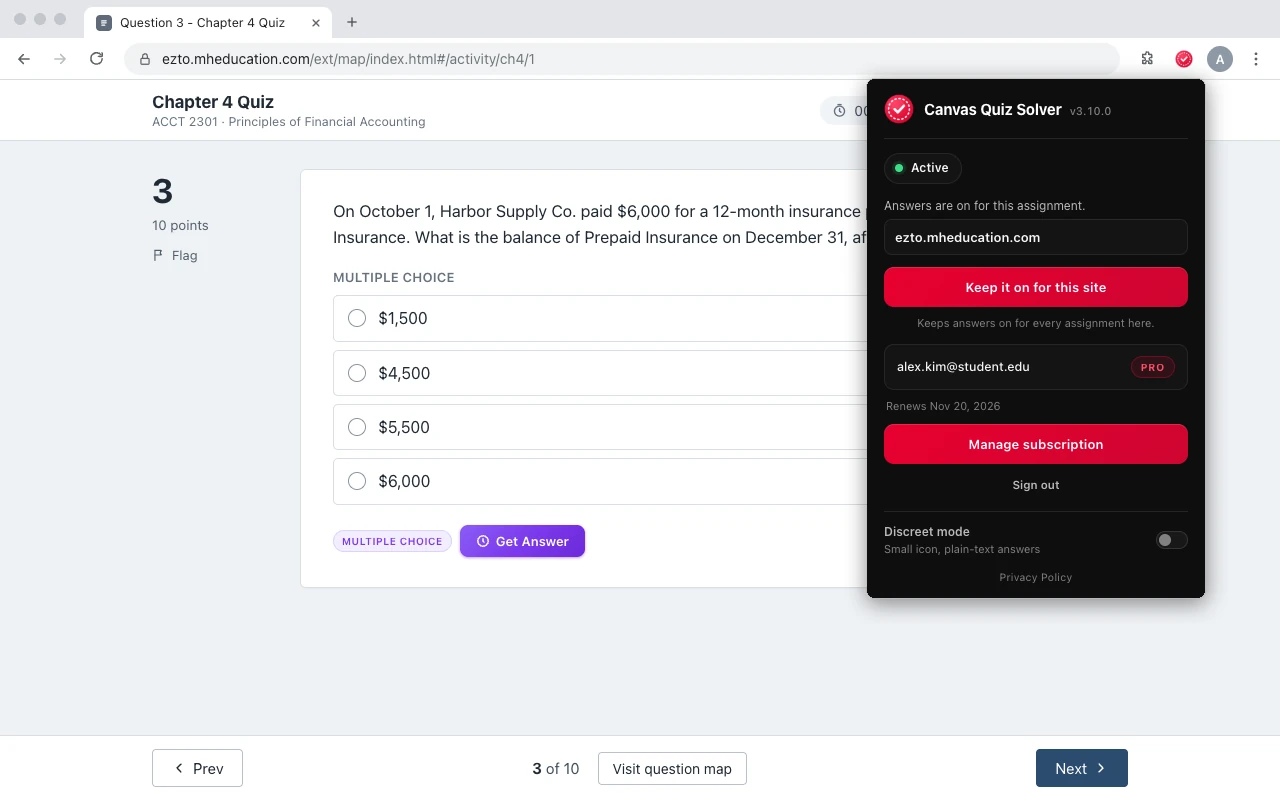
See every supported question type on the McGraw Hill page.
Sources we checked
- LMS Integration (McGraw Hill), checked 2026-10-21
- Integrating McGraw Hill Connect New UX (LTIA) with Canvas (McGraw Hill, PDF), checked 2026-10-21
- Connect - Deploying Connect Assignment to Canvas (McGraw Hill), checked 2026-10-21
- Add LTI Advantage shortcut to Canvas (McGraw Hill), checked 2026-10-21
- Incomplete Connect assignments sync with 0 points in LTI Advantage (McGraw Hill), checked 2026-10-21
- Connect - Registration from Brightspace (student) (McGraw Hill), checked 2026-10-21
- Connect - Onboarding: Getting Started (LMS) (McGraw Hill), checked 2026-10-21
- Creating Question Bank Assignments: Policy Settings (McGraw Hill, PDF), checked 2026-10-21
- Tips to Use McGraw Hill Connect: A Student's Guide (McGraw Hill blog), checked 2026-10-21
- McGraw-Hill Announces Integration of its McGraw-Hill Connect Learning Platform with Canvas (McGraw Hill, July 13, 2016), checked 2026-10-21
Common questions
How do I access McGraw Hill Connect through Canvas?
Open the Connect link in your Canvas course, click Begin, then sign in or create a Connect account and register for the course. After that, each Connect assignment opens from its Canvas link.
Why is my Connect grade not showing in Canvas?
Check that you clicked Submit, not Save and Exit, and whether the assignment is graded. If it still does not show, ask your instructor to re-sync it. The McGraw Hill grade sync can re-sync one student or one assignment.
Why did Canvas give me a 0 for a Connect assignment?
With LTI Advantage, McGraw Hill sends a 0 to Canvas after the due date for anything not submitted, or after the late or exception date if you have one.
Do I need a separate Connect account if I use Canvas?
You need a Connect account, but you can create it from Canvas the first time you click Begin. If you already have one under another email, sign in with it.
Does Connect work with Blackboard, D2L or Moodle?
Yes. McGraw Hill lists Blackboard Learn, D2L Brightspace, Canvas and Moodle for its LTI Advantage connection, with single sign-on and grade sync.
Does Canvas Quiz Solver work on Connect assignments opened from Canvas?
Yes, in beta. The assignment opens in McGraw Hill's question player, and the extension shows the answer under each question there, with the same account and plan as on Canvas.
One extension for Canvas and McGraw Hill
Answers under the question, on your Canvas quizzes and your Connect assignments. You pick, you submit. Start free.