How to get answers on McGraw Hill Connect and SmartBook: every method, compared
There is no student answer key for McGraw Hill Connect. You get answers from Connect's own feedback, if your instructor turns it on, or from a tool that reads your question.
- Check my work marks your answer right or wrong, but it never shows the correct answer.
- Correct answers after you submit show only if your instructor allows detailed feedback.
- Answer keys, Quizlet and PDFs often do not match, because Connect changes the numbers in many questions.
- A ChatGPT tab means a round trip for every question, and Connect quiz pages turn off the right-click menu.
- Canvas Quiz Solver shows the answer under each question, inside the McGraw Hill page.
Our pickCanvas Quiz Solver puts an AI answer right under each Connect and SmartBook question. No second tab, no screenshots, and you pick and submit the answer yourself.
The short answer
The fastest way to get answers on McGraw Hill Connect is a tool that reads the question in the page and shows the answer under it. Connect itself gives answers only through the feedback your instructor turns on.
Students search for a McGraw Hill answer key, but Connect does not give one to students. What you can use depends on three things: what your instructor allowed, whether the numbers in your question are your own, and how much copying you are ready to do. The table compares every method on those points.
| Method | Speed | Matches your numbers | Stays in the page | Cost |
|---|---|---|---|---|
| Check my work | Fast, but only right or wrong | Yes | Yes | Free, if your instructor turns it on |
| Feedback after you submit | After the attempt or the due date | Yes | Yes | Free, if your instructor allows it |
| Answer keys, Quizlet, PDFs | Slow: search and compare | Often not | No | Free to paid |
| Chegg and homework sites | Minutes to hours | Only if someone solved your version | No | Paid |
| ChatGPT in a second tab | Slow: type or screenshot each question | Yes, if you copy it right | No | Free to paid |
| Canvas Quiz Solver | Seconds per question | Yes: it reads your question | Yes | Free answers to try, then $14.99/month |
The rest of this guide goes through each method, with McGraw Hill's own help pages as the source for what Connect shows.
When Connect shows correct answers
Connect shows correct answers only when your instructor allows it, and usually only after you submit. Each assignment has its own feedback settings, so two assignments in one course can behave differently.
Check my work
Check my work tells you whether your answer is right, not what the right answer is. McGraw Hill's guide on resource assistance types says that when you click "check my work", a check icon appears if the answer is correct and an "x" if it is incorrect. It adds: "The actual answer won't be given."
The same page warns instructors that on multiple choice, students can find the correct answer "through process of elimination". That is why many instructors limit how many times you can check each question, or switch the feature off.
Feedback after you submit
After you submit, Connect can show your answers, the correct answers and explanations, if the feedback setting allows it. McGraw Hill's policy settings guide lists the choices an instructor has: no feedback, total scores only, or total scores before the due date with all detailed feedback after it. It also says that "detailed feedback will always include the correct answers", and that instructors can hold feedback until a set date.
To look, open the assignment report and click View attempt. McGraw Hill's student guide to viewing your grades says that View Attempt lets you review your answers and the feedback, and that Show Correct Answers lets you review the explanation for each question. Its submission details page adds: "Your instructor can limit the feedback that is available to you upon submission."
In short, Connect's own answers come after the work is graded. They help you study for the next attempt or the exam. They do not help on the question in front of you now. Attempts, late penalties and Check my work in detail: how Connect grades your homework.
Is there a McGraw Hill answer key for students?
No. McGraw Hill keeps its answer material for instructors, and Connect changes the numbers in many questions, so a shared key often does not match yours.
McGraw Hill's page on accessing instructor resources describes PowerPoints, test banks and media files that instructors open from their own Connect account. Students do not get those files. A PDF that calls itself a "Connect answer key" is usually a copy of one student's old attempt, or a page of search spam.
The bigger problem is the numbers. McGraw Hill's accounting page says instructors build Connect assessments with "algorithmic variation, and randomized question order". In plain words, your question can have different values than your classmate's, and the questions can come in a different order. A key from last semester then gives you a right answer to a different question.
Questions with no numbers, such as many multiple choice and true/false items, can match a key. But you still have to find your question in a long list, check that the choices are the same, and switch tabs for every question.
Quizlet, Chegg and homework sites
Quizlet, Chegg and homework sites can help on questions that never change, but they are slow and they often miss your exact version.
- Quizlet flashcard sets are made by other students from their own attempts. They have no numbers of your own, nothing tells you if the set is right, and you search for each question by hand.
- Chegg and similar answer sites work when someone already posted your exact problem. With changed values, you get a worked method, and you redo the math yourself.
- Homework-for-hire sites rank high for McGraw Hill searches. They sell someone else's time, they cost far more than a tool, and you give your login to a stranger.
All three take you out of the assignment for every question. On a 40-question SmartBook, that adds up fast.
A ChatGPT tab or a screenshot tool
A chatbot gives a fresh answer to your own version of the question, but you have to get the question to it, and Connect makes copying awkward.
Connect quiz pages turn off the right-click menu: captured Connect quiz pages carry oncontextmenu="return false" on the page. Copying with the keyboard can still work on some questions, but math and images do not paste well. So the usual path is to copy, retype or screenshot the question, paste it into ChatGPT or Gemini in another tab, read the answer, and come back. You do that for every question.
Screenshot extensions shorten that loop. SnapGPT, for example, screenshots the question when you click its button and reads the image with AI. You still trigger a capture for each question, and the answer shows in the tool's own box, not under the question. Our guide to the best AI for McGraw Hill compares these tools side by side, with prices.
Text-based questions also carry math. Connect draws equations with MathJax, so a copy of the page text can lose fractions and exponents. A screenshot keeps them, but a typed copy often does not.
An answer inside the page
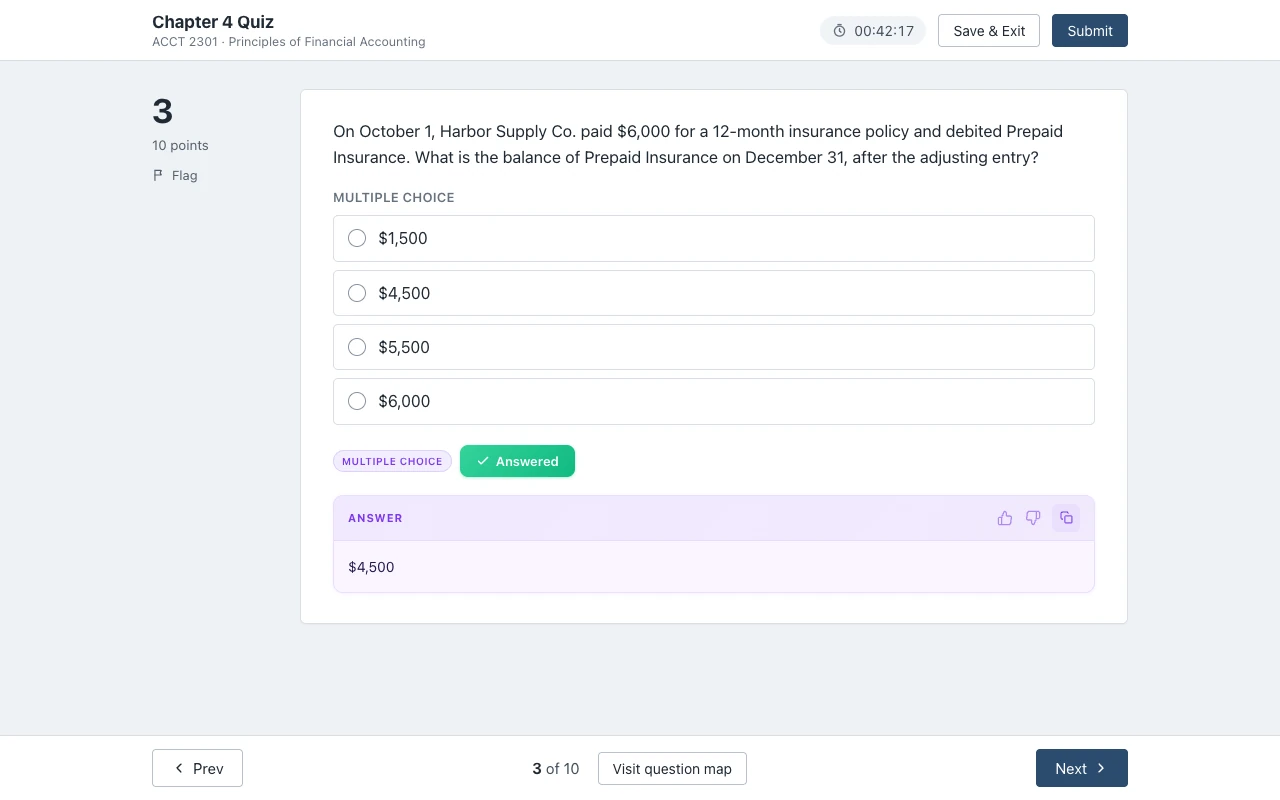
Canvas Quiz Solver shows the answer right under each McGraw Hill question, in the same tab. Nothing to copy, no screenshot and no second tab.
It is a Chrome extension. It reads the question from the page itself, so it sees your numbers, your choices and your math. The answer appears under the question in Connect. In SmartBook, it appears above the High, Medium and Low confidence buttons. You read it, pick the answer yourself, and submit when you are ready. The extension never fills in, clicks or submits anything for you.
It works on McGraw Hill Connect assignments and quizzes and on SmartBook. McGraw Hill support is in beta. On Connect it reads multiple choice, true/false, yes/no, check all that apply, fill in the blank, numeric, matching, ranking, short answer and essay. In SmartBook it reads multiple choice, true/false, multiple select, fill in the blank, matching and ordering.
To turn it on:
- Add Canvas Quiz Solver to Chrome.
- Open your McGraw Hill assignment and click the extension icon.
- Tap "Keep it on for this site" and allow the one Chrome prompt. After that, it is on for every assignment on that site.
Some parts of Connect are not supported yet: worksheets with several parts (such as accounting problems), the accounting tool, external tools, surveys, document uploads and the older Connect player. On those, the extension says "This question type isn't supported yet." instead of guessing.
It is the same account and the same plan as on Canvas. You get free answers to try. When they run out, Unlimited is $14.99/month, or $48.99 for a 4-month semester. Answers come from AI and can be wrong, so check the ones that matter. For the full feature list, see Canvas Quiz Solver on McGraw Hill Connect, and for SmartBook, SmartBook answers. What works in your course: McGraw Hill Connect answers by subject. Stuck on the start-of-term orientation? See SmartBook orientation answers.
On proctored exams
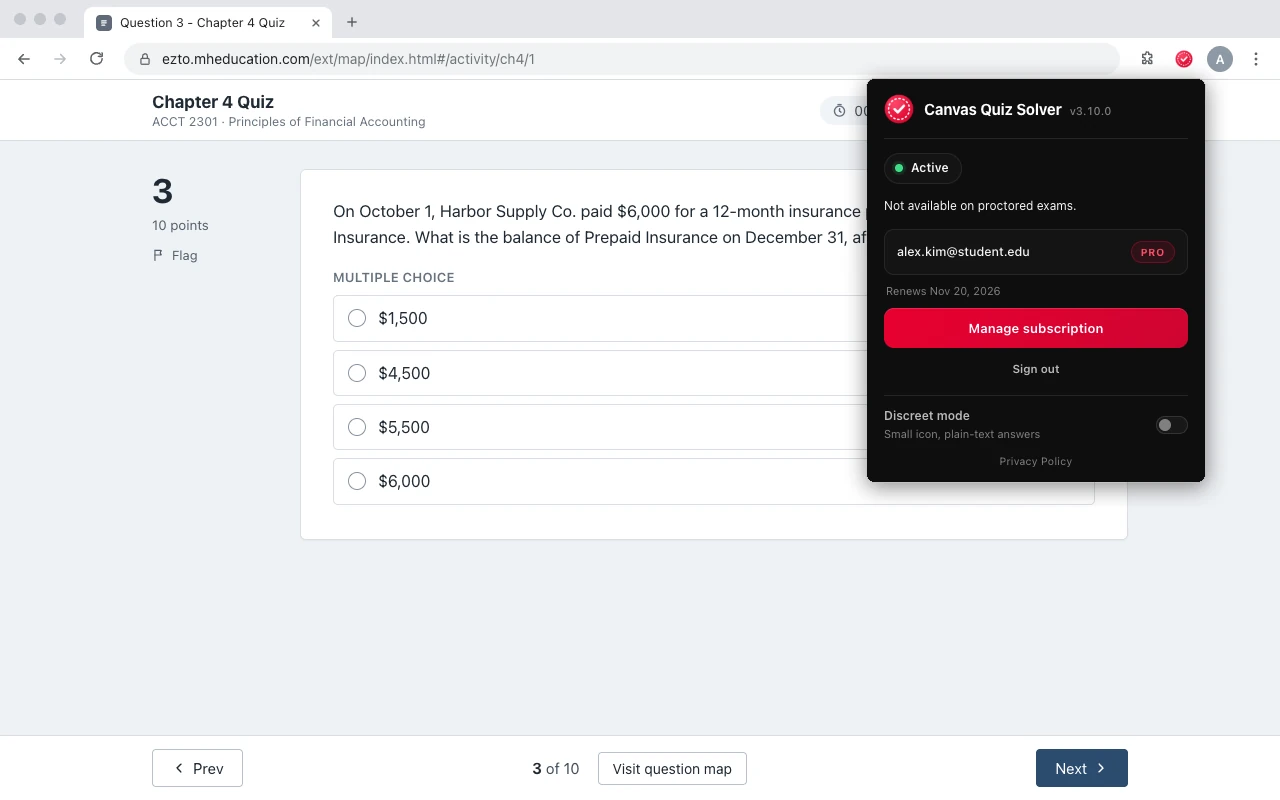
On a proctored McGraw Hill exam there is no method in this guide, and Canvas Quiz Solver stays off.
Connect's remote proctoring runs through Proctorio. McGraw Hill's Proctorio page lists what an instructor can switch on: control of other tabs and programs, no second monitor, no copy, cut and paste, no right-click, and "Disable extensions", which prevents other browser extensions. It can also record video, audio and the screen.
Canvas Quiz Solver does not run on proctored exams. When it sees a proctored page, the popup says "Not available on proctored exams." and nothing shows on the page. Use it on homework, quizzes and SmartBook, where you would otherwise open a second tab. How exams are set up, and how to tell if yours is proctored: McGraw Hill Connect exams.
Sources we checked
- Connect - Resource assistance types (McGraw Hill), checked 2026-10-21
- Creating Question Bank Assignments: Policy Settings (McGraw Hill, PDF), checked 2026-10-21
- Viewing Your Grades - Student Experience (McGraw Hill, PDF), checked 2026-10-21
- Connect - View Assignment Submission Details (McGraw Hill), checked 2026-10-21
- Connect Accessing Instructor Resources (McGraw Hill), checked 2026-10-21
- Accounting (McGraw Hill, Comprehensive Test Bank section), checked 2026-10-21
- Proctorio in Connect (McGraw Hill), checked 2026-10-21
- Captured Connect quiz page markup (public GitHub gist, July 2025), checked 2026-10-21
- McGraw Hill Connect Answers in One Click (SnapGPT), checked 2026-10-21
Common questions
How do I see answers on McGraw Hill?
After you submit, open the assignment report and click View attempt, then Show Correct Answers. That works only if your instructor allows detailed feedback. While you work, Check my work marks you right or wrong, and Canvas Quiz Solver shows an AI answer under each question.
Do McGraw Hill books have answer keys?
Yes, but for instructors. McGraw Hill gives instructors test banks and other resources through their Connect account. Students do not get them, and Connect changes the numbers in many questions, so a key from someone else often does not match your version.
Where can I find McGraw Hill answers?
In Connect's own feedback after you submit, if your instructor allows it; in Quizlet sets and answer sites, which often miss your numbers; or with a tool that reads your question. Canvas Quiz Solver shows the answer inside the McGraw Hill page.
How do I see my overall grade in McGraw Hill Connect?
Click the Menu icon in the upper left of your Connect home page, open Results and select your course. McGraw Hill's student guide says that page lists your graded assignments, scores and number of attempts. Your instructor sets whether scores show as points or percentages.
Does McGraw Hill Connect take the highest score?
It depends on your instructor. Each assignment has its own attempt settings, and McGraw Hill does not document one rule for which attempt counts. Check the assignment details or your syllabus.
Does Check my work show the correct answer?
No. McGraw Hill says a check icon appears if your answer is correct and an x if it is not, and that the actual answer will not be given. Your instructor can limit how many times you use it, or turn it off.
How do I get answers for multiple choice questions on Connect?
Canvas Quiz Solver names the correct option under the question, in the same page, and you click it yourself. Without a tool, Check my work tells you whether your pick is right, where your instructor allows it.
Does Canvas Quiz Solver submit answers for me?
No. It shows the answer under the question, and you pick it and submit. It never fills in, clicks or submits anything. It also stays off on proctored exams.
Answers inside McGraw Hill, without a second tab
Canvas Quiz Solver shows the answer right under each Connect and SmartBook question. You pick, you submit.