The best AI for McGraw Hill Connect and SmartBook, compared
The best AI for McGraw Hill depends on one question: do you want to see the answer and click it yourself, or let a bot fill in the assignment?
- Shows the answer in the page: Canvas Quiz Solver puts it under each Connect and SmartBook question. You pick and submit.
- Answers in its own box: SnapGPT, Apex Vision AI and QuizMate show the answer in a panel or popup after you capture, highlight or click (QuizMate adds a button to SmartBook questions).
- Fills in and moves on: SolveX Auto-Solve, auto-mcgraw and Silent Student work through the set for you.
- McGraw Hill's own AI (AI Reader, Learning Coach) explains the material. It is not built to answer your assignment.
- None of them is for proctored exams.
Our pickCanvas Quiz Solver: the answer sits under the question, in the same tab. No screenshots, no second tab, and nothing is clicked or submitted for you. One plan covers Canvas and McGraw Hill.
Quick picks
For most students the best AI for McGraw Hill is one that shows the answer in the page and lets you click it yourself: it is fast, and you stay in control of what you submit.
The tools below differ on four points. How does the tool get the question: from the page, from a screenshot, or from you? Does it only show the answer, or fill it in and move on? Does it cover Connect, SmartBook or both? And what does it cost for a semester? The table answers each point from the tool's own page.
| Tool | How it reads the question | Shows or fills | Connect / SmartBook | Price on its page | Proctored exams |
|---|---|---|---|---|---|
| Canvas Quiz Solver (ours) | From the page itself | Shows the answer under the question; you pick and submit | Both, in beta | Free answers to try; $14.99/month or $48.99 per 4-month semester | Stays off: "Not available on proctored exams." |
| SnapGPT | Screenshot of the question | Shows; on Plus, Autopilot clicks through a set and "never submits" | Both | Free: 5 answers a day; Plus $7.99/week, $9.99/month or $89.99/year | Says lockdown software disables it |
| Apex Vision AI | Highlighted text, side panel or a screenshot | Shows an answer with steps; its SmartBook page also describes a shortcut that auto-fills | SmartBook page; Connect not named as a feature | 30 free requests, refilled every 12 hours; $7.99, $14.99 or $19.99/month for 500, 1,000 or 2,000 requests | Not stated on the pages we read |
| SolveX | From the page | Fills in answers; Auto-Solve moves through the activity | Both | 60 minutes and 100 solves free; plans from $4.99; $2.99 day pass | Says do not use it there |
| QuizMate | A button on SmartBook multiple choice, multiple select and matching questions; highlight or snapshot elsewhere | Shows the answer in its popup box; an "Auto Select Answers" setting, off by default, clicks the choice | SmartBook button; no Connect code found, so snapshot there | $7.99/week, $19.99/month or $10.99/month billed yearly | Not stated on the pages we read |
| Silent Student | A desktop app with its own browser | Works the assignment and submits it | Both | $11.99, $24.99 or $49.99/month; no free plan | Says it does not take them |
| auto-mcgraw | From the page, sent to your ChatGPT, Gemini or DeepSeek tab | Fills in, clicks the confidence button (High by default) and moves on, unless Pause Before Submit is on | SmartBook; v3.0 also loads on Connect quiz pages for multiple choice, true/false and fill in the blank | Free (you bring the AI account); zip from GitHub, not on the Chrome Web Store | Not stated |
| BetterBook | Its Chrome button installs SmartSolve: highlight or snapshot | Shows in SmartSolve's own window; we found no auto-click code | Any page, one question at a time; no SmartBook code found | No price on its pages | Not stated on the pages we read |
| ChatGPT or Gemini in a second tab | You type or screenshot it in | Shows; you go back and enter it | Any page you can capture | Free tiers and paid plans | Blocked when the exam locks tabs |
| McGraw Hill AI Reader | Passages you highlight in the eBook | Explains and quizzes you; not built for assignment answers | Inside the Connect eBook, in courses that include it | Comes with the course | Not applicable |
Checked on 2026-10-21 from each tool's own page or store listing (linked on its name). We tested only our own tool. We left out accuracy percentages, because none of them is independent. One-to-one comparisons: auto-mcgraw, BetterBook and QuizMate.
Canvas Quiz Solver
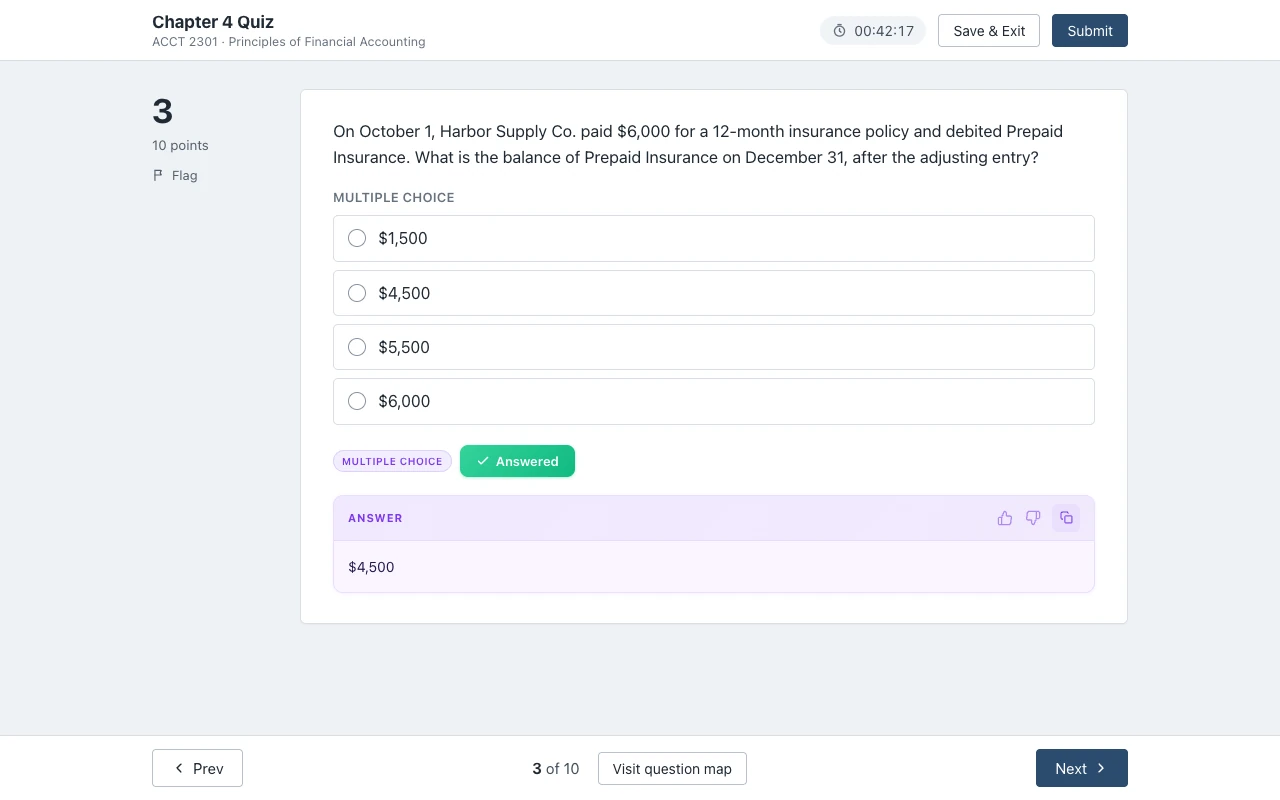
Canvas Quiz Solver shows an AI answer right under each McGraw Hill question, in the same tab, and you pick and submit it yourself. It is our product, so read this section as our own pitch, with the limits included.
It reads the question from the page, so it sees your own numbers, choices and math, with no screenshot. In Connect, the answer appears under the question. In SmartBook, it appears above the High, Medium and Low confidence buttons, so you can read it, pick it and rate your confidence without leaving the question. It never fills in, clicks or submits anything for you.
- Connect question types: multiple choice, true/false, yes/no, check all that apply, fill in the blank, numeric, matching, ranking, short answer and essay.
- SmartBook question types: multiple choice, true/false, multiple select, fill in the blank, matching and ordering.
- Not supported yet: Connect worksheets with several parts (such as accounting problems), the accounting tool, external tools, surveys, document uploads and the older Connect player. It says "This question type isn't supported yet." on those.
- Setup: open the assignment, click the extension icon and tap "Keep it on for this site". One Chrome prompt, then it is on for every assignment there.
- Price: free answers to try, then $14.99/month or $48.99 per 4-month semester. The same plan works on Canvas quizzes.
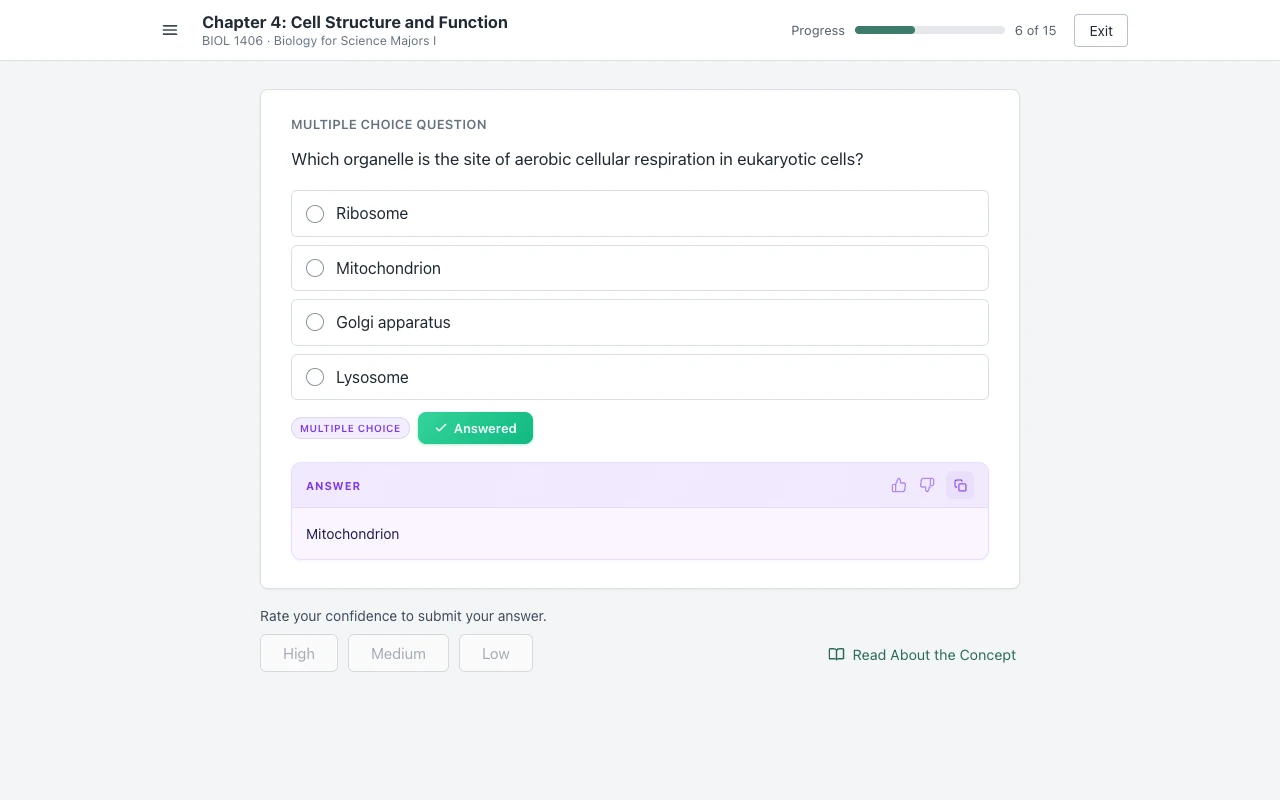
McGraw Hill support is in beta, and answers come from AI, so they can be wrong. It stays off on proctored exams. More on Canvas Quiz Solver for McGraw Hill Connect and SmartBook answers.
SnapGPT
SnapGPT is a screenshot tool: you click its button, it captures the question, and the answer shows in its own box.
Its McGraw Hill Connect page says it "screenshots the question exactly as Connect renders it, then reads it with vision AI", and that it works on Connect homework, chapter quizzes and SmartBook. Reading an image is good for graphs and tables. The cost is one capture per question, and the answer is in SnapGPT's panel or, in its Subtle Mode, in the URL bar, not under the question.
On the paid plan, its Autopilot "can click through a question set for you, one question at a time". SnapGPT says "it never submits". The free plan gives 5 screenshot answers a day; Plus is $7.99 a week, $9.99 a month or $89.99 a year. On proctored exams, SnapGPT says lockdown software disables all extensions, SnapGPT included. Our full comparison is on SnapGPT vs Canvas Quiz Solver.
Apex Vision AI
Apex Vision AI is a general homework extension with a SmartBook guide; it reads highlighted text or a screenshot and shows the answer with steps.
Its SmartBook page lists three ways in: select the question text and click a pop-up, open a side panel, or press Ctrl + Shift + Z and drag over an image. The same page also says "Press Ctrl + Q (Cmd on Mac) and watch the correct option auto-fill", and describes methods that "mimic human typing/clicking speed". The page names SmartBook; it does not list Connect assignments as a separate feature.
Pricing is per request. The pricing page gives 30 free requests, refilled every 12 hours, then $7.99, $14.99 or $19.99 a month for 500, 1,000 or 2,000 requests. A long SmartBook can use many requests. See Apex Vision AI vs Canvas Quiz Solver.
SolveX
SolveX is built only for McGraw Hill, and it fills in answers rather than showing them.
Its Connect page says it "reads supported Connect questions, chooses an answer, and enters it on the page", and that Auto-Solve "can move through supported homework activities from one question to the next". You can pause it or use one-question mode. The page also says the extension can use a second model "before it submits". If you want to decide each answer yourself, that is the opposite of what Auto-Solve is for.
New accounts get 60 minutes and 100 solves free, with no card. The pricing page lists Starter, Pro and Beast plans from $4.99, and a $2.99 day pass. Its home page also says it supports multiple choice, true/false, fill in the blank, multi-select, drag interactions, matching, ordering and some image questions, with "availability" that "varies by plan". SolveX says not to use it on proctored or locked assessments.
QuizMate
QuizMate is a general study extension that adds its own button to SmartBook questions and shows the answer in its popup box.
Its Chrome Web Store listing (30,000 users, checked 2026-10-21) says it works with "Canvas, McGraw Hill, Blackboard, Moodle, and many more". We read the code of version 5.1.87: it adds a button to SmartBook multiple choice, multiple select and matching questions, and the answer shows in QuizMate's popup box on the page, not under the question. An "Auto Select Answers" setting, off by default, clicks the choice for you when you turn it on. We found no code for Connect assignment pages, so there you highlight a question and pick "Ask QuizMate", or capture it with Snapshot.
The QuizMate site lists $7.99 a week, $19.99 a month, or $10.99 a month billed yearly. The pages we read say nothing about proctored exams. Full comparison: QuizMate vs Canvas Quiz Solver.
Silent Student
Silent Student is a desktop agent, not an extension: it opens the assignment in its own browser, works it and submits it.
Its comparison page for this exact search ranks in Google, and it is Silent Student's own page; it says "Silent Student makes one of these tools" and names itself as "Our pick". By its own description, it is a desktop app for Mac and Windows that opens Connect or SmartBook from your Canvas course, "works it" and submits with the platform's own button. It has a dedicated SmartBook solver, and it runs Connect homework on a general agent that its pricing page calls "less predictable".
It costs $11.99, $24.99 or $49.99 a month, with no free plan. It says it does not take proctored exams. If you want the work done without you, this is that kind of tool. If you want to see each answer and choose, it is not.
auto-mcgraw on GitHub
auto-mcgraw is a free, open-source extension that runs your SmartBook through a ChatGPT, Gemini or DeepSeek tab and fills in the answers.
Its README explains the setup: download a zip, turn on Developer mode in Chrome and load it unpacked. It is not on the Chrome Web Store, and the README warns that copies there are "fraudulent/unofficial reuploads". Once started, it sends each question to your AI tab, "automatically fills in answers", clicks the confidence button itself (High by default) and moves through the assignment. Version 3.0 also loads on Connect quiz pages for multiple choice, true/false and fill in the blank.
Its settings include Randomize Confidence and a Pause Before Submit option, which makes it wait for you before each submit. It is free because you bring your own AI account. When SmartBook changes, a volunteer project can break until someone fixes it, so check the last update before you rely on it. Full detail: auto-mcgraw, how it works and what to use instead.
ChatGPT or Gemini in a second tab
A chatbot in another tab works on any question you can get into it, but on McGraw Hill that means typing or screenshotting every question.
Connect quiz pages turn off the right-click menu, and math and images do not paste well, so many students retype or screenshot each question. The loop is: capture the question, switch tabs, paste, read, switch back, enter the answer. On a long SmartBook that is dozens of round trips. Math also suffers when you retype it. The plus side: free tiers exist, and the chatbot can explain the method if you ask.
Our guide on how to get answers on McGraw Hill compares this with Connect's own feedback and answer keys.
McGraw Hill's own AI Reader
McGraw Hill's AI Reader explains your textbook; it is a study tool inside the eBook, not an assignment helper.
McGraw Hill's AI page says AI Reader lets students "highlight specific textbook passages, generate simplified explanations and quiz themselves", and that more than 2.5 million students have used it. Its student help page calls it "a generative AI learning tool within your eBook" that "directly references the content your instructor chose". The same AI page describes Learning Coach, a "conversational AI tutor" that reviews concepts and gives step-by-step explanations.
These tools are good for learning a chapter. McGraw Hill does not describe them as giving answers to your graded questions, and they are only in courses that include them.
Gone: SolveMyBook and SmarterBook
Two names that still show up in searches no longer work.
SolveMyBook now shows one line: "This website and the associated browser extension have been discontinued." (checked 2026-10-21). SmarterBook added search buttons above each SmartBook question. Its developer writes that on February 7, 2024 he received a cease-and-desist letter from McGraw Hill's law firm, and that on March 9 he shipped an update that turned the extension off. For what to use instead, see what happened to SolveMyBook.
Can McGraw Hill detect AI?
McGraw Hill does not document a tool that flags AI-written answers on Connect homework or SmartBook. What it documents is attempt reports with time on task, an originality checker for writing assignments, and Proctorio on proctored exams, which can disable extensions and record the screen.
The full answer, with sources: can McGraw Hill detect AI? For everything else Connect logs, read does McGraw Hill Connect detect cheating?
How to choose
Pick on three points: who clicks the answer, how the tool gets the question, and the price for a full semester.
Show or fill
A tool that shows the answer leaves every click to you. A tool that fills in and moves on does the clicking, and with Auto-Solve or an agent, you may not see each answer before it counts. Showing is slower by a second per question. It also means you can skip an answer that looks wrong.
Page or screenshot
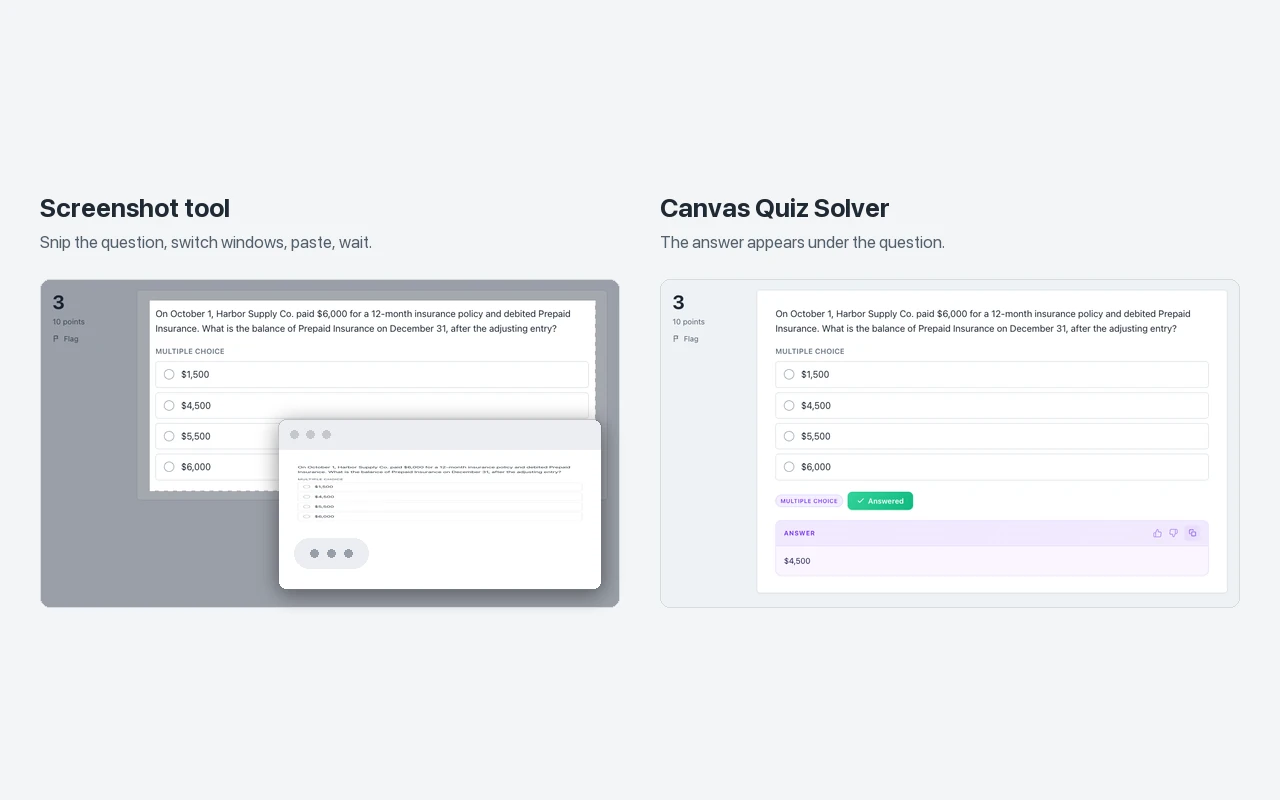
A screenshot tool needs a capture for every question, and the answer appears in its panel. A tool that reads the page sees the question as soon as it loads, with the exact numbers and math, and can put the answer right where you are looking.
Price per semester
A semester is about four months. On the prices above: Canvas Quiz Solver is $48.99 on its semester plan; SnapGPT Plus is about $40 on monthly billing; QuizMate is about $80 on monthly billing; Silent Student starts near $48 and goes to about $200; Apex Vision AI is $32 to $80 with a request cap. Check how each one counts answers: a per-request cap or a daily limit can run out in the middle of a long assignment.
Sources we checked
- McGraw Hill Connect Answers in One Click and Pricing (SnapGPT), checked 2026-10-21
- SmartBook answers guide and Pricing (Apex Vision AI), checked 2026-10-21
- Connect page, home page and Pricing (SolveX), checked 2026-10-21
- QuizMate (Chrome Web Store), version 5.1.87 of its code, and quizmate.io, checked 2026-10-21
- Best AI for McGraw Hill Connect and SmartBook, compared (Silent Student), checked 2026-10-21
- auto-mcgraw README and v3.0 code (GitHub), checked 2026-10-21
- betterbookextension.com and the SmartSolve listing it links to, checked 2026-10-21
- AI-Powered Learning Tools and The McGraw Hill AI Reader within eBook (McGraw Hill), checked 2026-10-21
- Proctorio in Connect (McGraw Hill), checked 2026-10-21
- Writing Assignment Plus user guide (McGraw Hill, PDF), checked 2026-10-21
- Viewing Your Grades - Student Experience (McGraw Hill, PDF), checked 2026-10-21
- solvemybook.com, checked 2026-10-21
- I got a cease and desist letter (Micah Lindley, SmarterBook developer), checked 2026-10-21
Common questions
What is the best AI tool for McGraw Hill?
For most students, a tool that shows the answer inside the page and lets you click it yourself. Canvas Quiz Solver does that on Connect and SmartBook. If you want a bot to fill in the set, SolveX and auto-mcgraw do that, and Silent Student submits whole assignments.
Can McGraw Hill detect using AI?
McGraw Hill does not document an AI detector for Connect homework or SmartBook. It documents attempt reports with time on task, an originality checker for writing assignments, and Proctorio for proctored exams, which can disable extensions and record the screen.
What AI does McGraw Hill use?
McGraw Hill's own AI tools include AI Reader, which explains highlighted eBook passages and quizzes you, and Learning Coach, a conversational tutor. They come with courses that include them. The pages we read do not name the AI model behind them.
Can teachers tell if you use ChatGPT on McGraw Hill?
McGraw Hill does not document a ChatGPT detector. Instructors see scores, attempts and time on task. Writing assignments can use an originality checker against the internet and other students' work. Proctored exams can lock tabs and record your screen.
Is there a free AI for McGraw Hill?
Several tools have free tiers: SnapGPT gives 5 answers a day, Apex Vision AI 30 requests refilled every 12 hours, SolveX a free trial, and auto-mcgraw is free with your own AI account. Canvas Quiz Solver gives free answers to try.
Does Canvas Quiz Solver work on McGraw Hill?
Yes, in beta. It shows answers on Connect assignments and quizzes and on SmartBook, under each question. You pick and submit; it never fills in or submits anything. It stays off on proctored exams, and the same plan covers Canvas.
What happened to SolveMyBook?
Its site now says the website and its browser extension have been discontinued. SmarterBook, another SmartBook extension, was turned off in March 2024 after McGraw Hill's law firm sent its developer a cease-and-desist letter.
See the answer, then choose it yourself
Canvas Quiz Solver shows an AI answer under each McGraw Hill Connect and SmartBook question, in the same tab.