SolveMyBook is discontinued. Here is what still works on McGraw Hill
SolveMyBook (solvemybook.com) was a paid extension for McGraw Hill Connect and SmartBook. Its site now says the website and the extension are discontinued. If you still have SmartBook due this week, here is what happened and what works today.
SolveMyBook is gone, and it gives no reason. You need a new tool.
- The site shows one line: “This website and the associated browser extension have been discontinued.”
- Still paying? There is no cancel button on the site now. Email its support address and watch your card statement.
- SmarterBook, an older SmartBook extension, shut down in March 2024 after a letter from McGraw Hill's law firm.
- Canvas Quiz Solver shows the answer inside the SmartBook or Connect page, right with the question. You pick and submit.
Our pickCanvas Quiz Solver works on McGraw Hill Connect and SmartBook (beta). No second tab, no screenshots, and you stay in control.
Add to Chrome - freeWhat happened to SolveMyBook
SolveMyBook shut down, and its site says nothing about why. On 2026-10-21 the homepage showed only this:
“This website and the associated browser extension have been discontinued.” solvemybook.com, checked 2026-10-21
The notice has no date. A Wayback Machine capture from 15 March 2026 still shows the full site. It sold plans at $9.99 a week, $24.99 a month, $49.99 a quarter and $99.99 a year. So it closed some time after mid-March 2026. We do not know the reason, and we do not guess one here.
What it did: its own extension page (December 2025 capture) said you click Solve, and “our auto solve feature automatically selects everything for you.”
SmarterBook got a legal letter in 2024
SmarterBook, another SmartBook extension, shut down in March 2024 after McGraw Hill's law firm sent its developer a cease-and-desist letter. The developer, Micah Lindley, told the story in his own post, “I got a cease and desist letter”.
- SmarterBook added a row of buttons above each question: search Google, search Quizlet, or ask an AI. It did not show answers on its own.
- On 7 February 2024 he got an email from the law firm Oppenheim + Zebrak.
- The letter objected to the name and to what the extension did. It said SmarterBook was “facilitating cheating by students”.
- On 9 March 2024 he pushed an update that sent users to a page explaining why the extension no longer worked.
A different site, smarterbookextension.com, uses the SmarterBook name today. Its page does not name the original developer.
What auto-solvers did, and why that is the risky kind
An auto-solver picks the answer, clicks it, and moves on to the next question without you. SolveMyBook said it “automatically selects everything”. The open-source auto-mcgraw fills in SmartBook answers, clicks the confidence button itself (High by default) unless you turn on Pause Before Submit, and moves through the reading sections on its own. Its v3.0 also loads on Connect quiz pages for multiple choice, true/false and fill in the blank (auto-mcgraw compared).
The risk is simple: you are not in the loop. AI answers can be wrong, and a bot submits a wrong answer before you ever read it. A tool that only shows the answer leaves every click, and every choice, with you.
Alternatives that work today
Seven tools answer McGraw Hill questions today, and they work in very different ways. Here is how each one works, from its own pages.
| Tool | How it works | Fills in answers for you | Proctored exams | Price |
|---|---|---|---|---|
| Canvas Quiz Solver | Answer shows inside the SmartBook or Connect page, with the question (beta) | No. You pick and submit | Does not run there | Free answers to try, then $14.99/mo or $48.99 per 4 months |
| SnapGPT | One click reads the question and answers on the page | Not by default. Autopilot (paid) clicks through a set and never submits | Says lockdown software disables it | $7.99/wk, $9.99/mo or $89.99/yr |
| Apex Vision | Highlight text, side panel or screen capture | Not stated on its SmartBook page | Not stated | From $7.99/mo for 500 requests |
| SolveX | Reads Connect questions and enters answers on the page | Yes. Auto-Solve moves through an activity | Says not for proctored exams | $2.99 day pass; weekly, monthly or semester plans |
| QuizMate | A button on SmartBook multiple choice, multiple select and matching questions; highlight or snapshot elsewhere (no Connect code found). Answer in its popup box | Only with its "Auto Select Answers" setting, which is off by default | Not stated | $7.99/wk, $19.99/mo, or $10.99/mo billed yearly |
| auto-mcgraw | Free GitHub project for SmartBook (v3.0 also some Connect quiz types); sends questions to your ChatGPT, Gemini or DeepSeek tab | Yes. Fills in, clicks the confidence button (High by default) and moves on, unless Pause Before Submit is on | Not stated | Free; zip from GitHub, loaded by hand in Developer mode (not on the Chrome Web Store) |
| BetterBook | Its site's Chrome button installs SmartSolve: highlight or snapshot, answer in its own window | One BetterBook site claims auto-solve; we found no auto-click code in SmartSolve | Not stated | No price on its pages |
More detail: SnapGPT vs Canvas Quiz Solver, Apex Vision vs Canvas Quiz Solver, auto-mcgraw, BetterBook vs Canvas Quiz Solver, QuizMate vs Canvas Quiz Solver and the best AI for McGraw Hill.
Canvas Quiz Solver on SmartBook
Canvas Quiz Solver shows the answer right on the SmartBook page, above the High, Medium and Low buttons. You read it, pick the option, choose your confidence, and go on. It never fills in, clicks or submits anything for you.
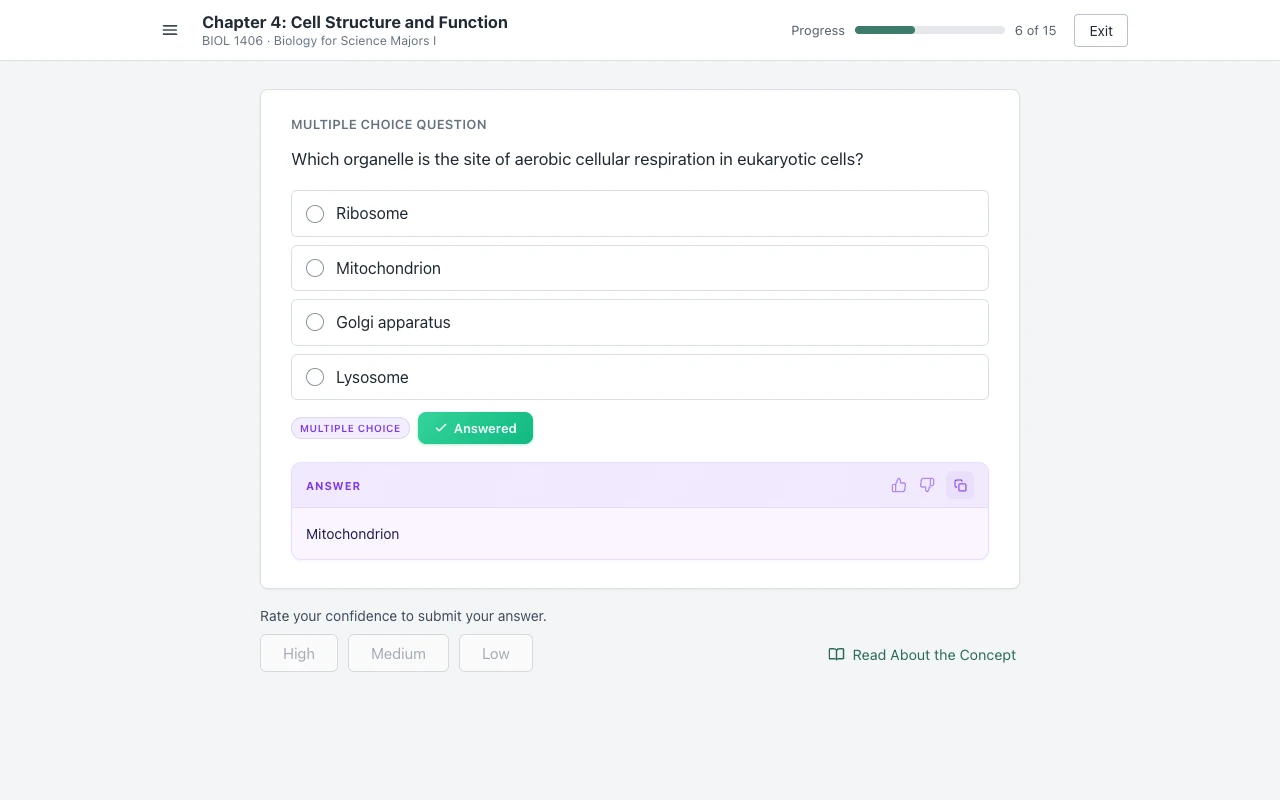
- SmartBook: multiple choice, true/false, multi-select, fill in the blank, matching and ordering.
- Connect assignments and quizzes: multiple choice, true/false, check all that apply, fill in the blank, numeric, matching, ranking, short answer and essay.
- Setup: open the assignment, click the extension icon, and tap “Keep it on for this site”. After that it is on for every assignment there.
- Where it stops: it does not run on proctored exams. Connect worksheets and a few other types show “This question type isn't supported yet.”
- One account: the same plan covers Canvas quizzes too. Answers come from AI and can be wrong, so you stay the one who decides.
Full details: Canvas Quiz Solver on SmartBook and on McGraw Hill Connect.
Common questions
What happened to Solve My Book?
It is discontinued. On 2026-10-21 solvemybook.com showed one line: "This website and the associated browser extension have been discontinued." The site gives no reason, so we do not guess one. It was still selling plans in a Wayback Machine capture from 15 March 2026.
How do I cancel my Solve My Book subscription?
The site has no cancel button now. Its login and dashboard pages are still up, but the dashboard only says the website is discontinued, with a log out button and support@solvemybook.com. Email that address and ask them to cancel. Find the charge on your card or bank statement, and if it keeps coming, ask your card issuer to stop future charges. If your receipt came from a payment company, its receipt email often has a manage link. We could not confirm which payment company SolveMyBook used.
What is the best AI tool for McGraw Hill?
It depends on how you want to work. If you want the answer shown inside the page while you pick and submit it yourself, Canvas Quiz Solver does that on SmartBook and Connect (beta). Screenshot tools like SnapGPT and Apex Vision answer in a popup or side panel. SolveX and auto-mcgraw fill in answers and move through the assignment for you.
Is SmarterBook back?
The original SmarterBook is not. Its developer, Micah Lindley, wrote that he received a cease-and-desist letter from McGraw Hill's law firm in February 2024 and shut the extension down on 9 March 2024. A site at smarterbookextension.com uses the name today. Its page does not name the original developer.
Your SmartBook is still due. Get the answers on the page.
One click. The answer shows with the question. You pick and submit.