SmartBook answers, right above the confidence buttons
Open a SmartBook assignment and each question shows an AI answer in the page, before you pick and rate your confidence. No second tab and no screenshots. You pick the answer and you click the button, so you stay in control.

The answer appears above High, Medium, Low
The answer shows under the question and right above the confidence buttons, so you see it before you commit.
That spot matters in SmartBook. SmartBook asks you to "Rate your confidence to submit your answer", and the High, Medium or Low button is the submit button. There is no separate Submit. A tool that shows the answer after you click is too late.
Here is what you see on each question. The question loads, and the answer appears in plain text under it. You pick that option, click your confidence, and SmartBook swaps in the next question in the same place. The new question gets its own new answer, with no click from you.
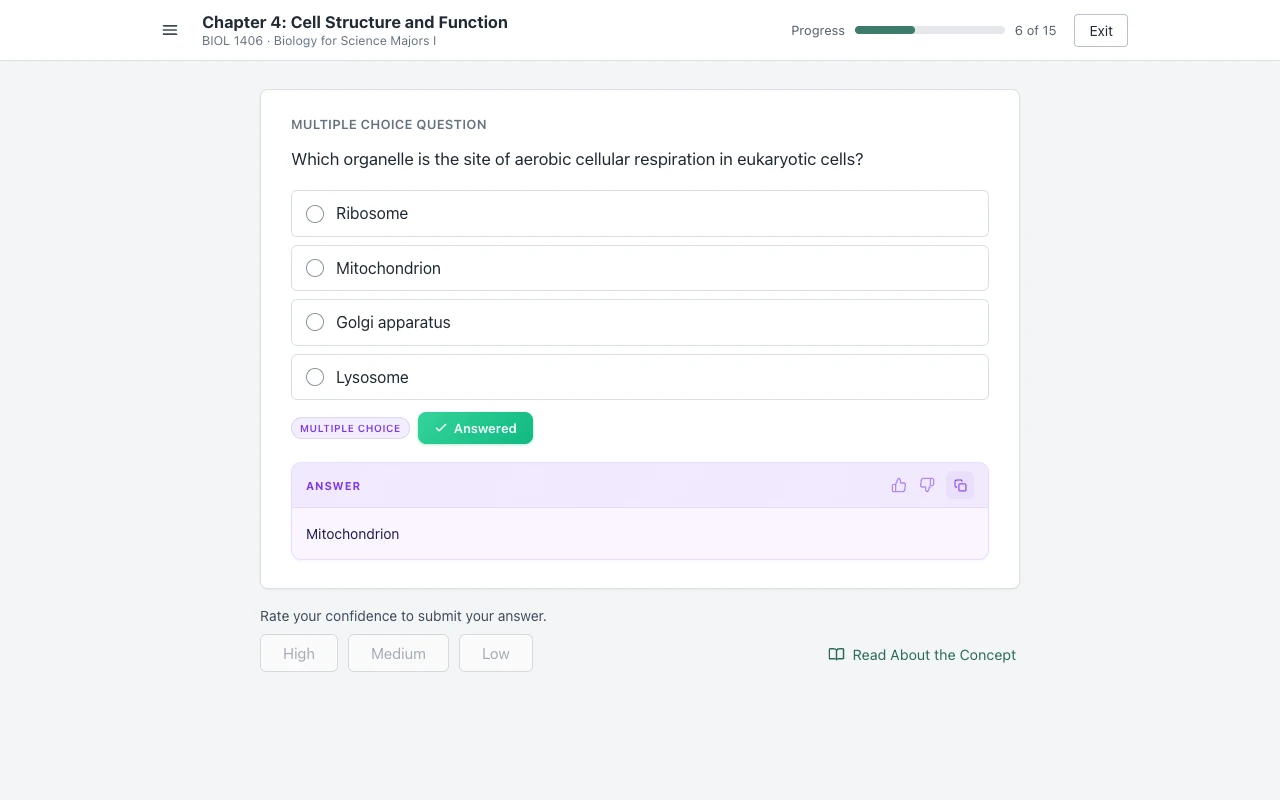
How to finish SmartBook faster
The slow part of SmartBook is looking things up, so the fastest way through is to have the answer on the question already.
With Canvas Quiz Solver each question is read, pick, rate, next, with no second tab. Right answers also mean fewer extra questions, because SmartBook asks more about a concept when you miss it. Answers come from AI and can be wrong, so read each one before you pick it.
More tips, with McGraw Hill's own rules: how to finish SmartBook fast.
Question types in SmartBook
It reads the six question types SmartBook uses most: multiple choice, true/false, multi-select, fill in the blank, matching and ordering.
Multiple choice
The answer names the option to pick.
True or false
The answer says True or False.
Multi-select
The answer lists every option to tick.
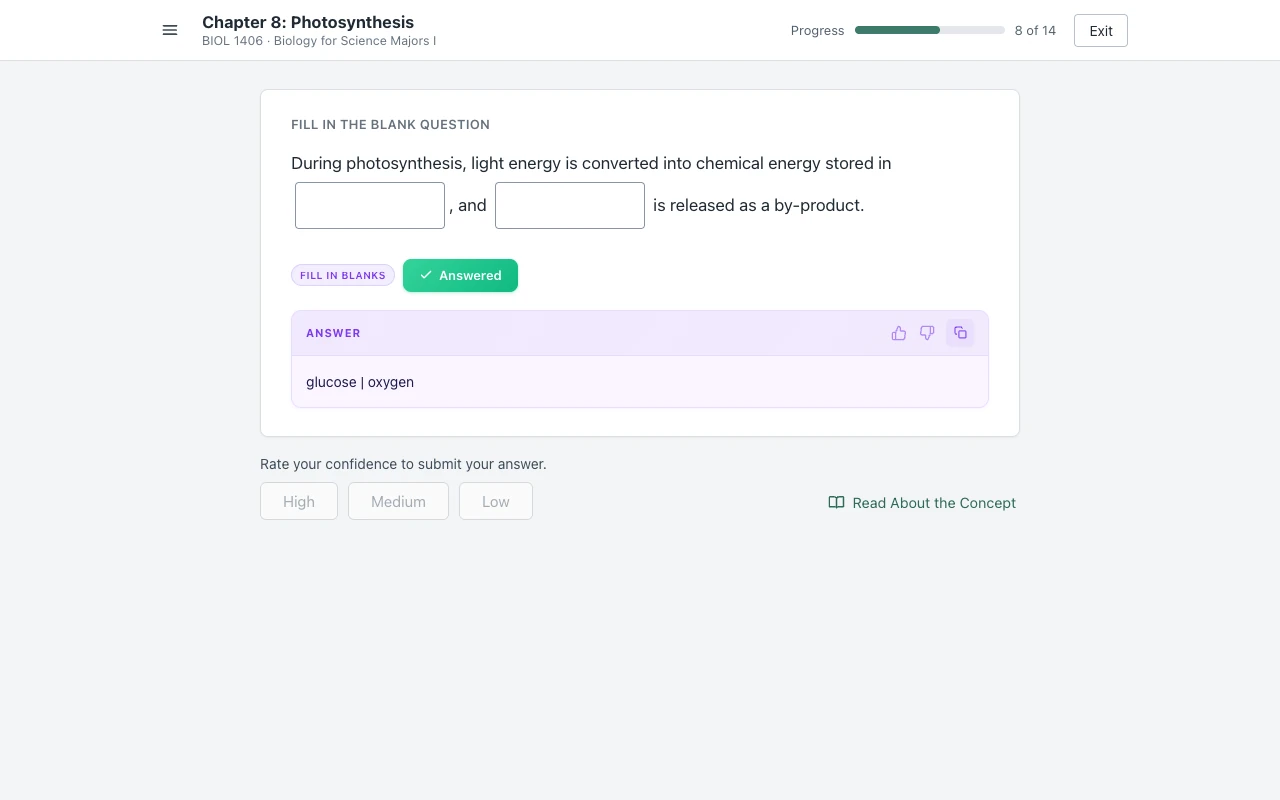
Fill in the blank
The answer gives the word for each blank, in order.
Matching
The answer lists the pairs, one per line.
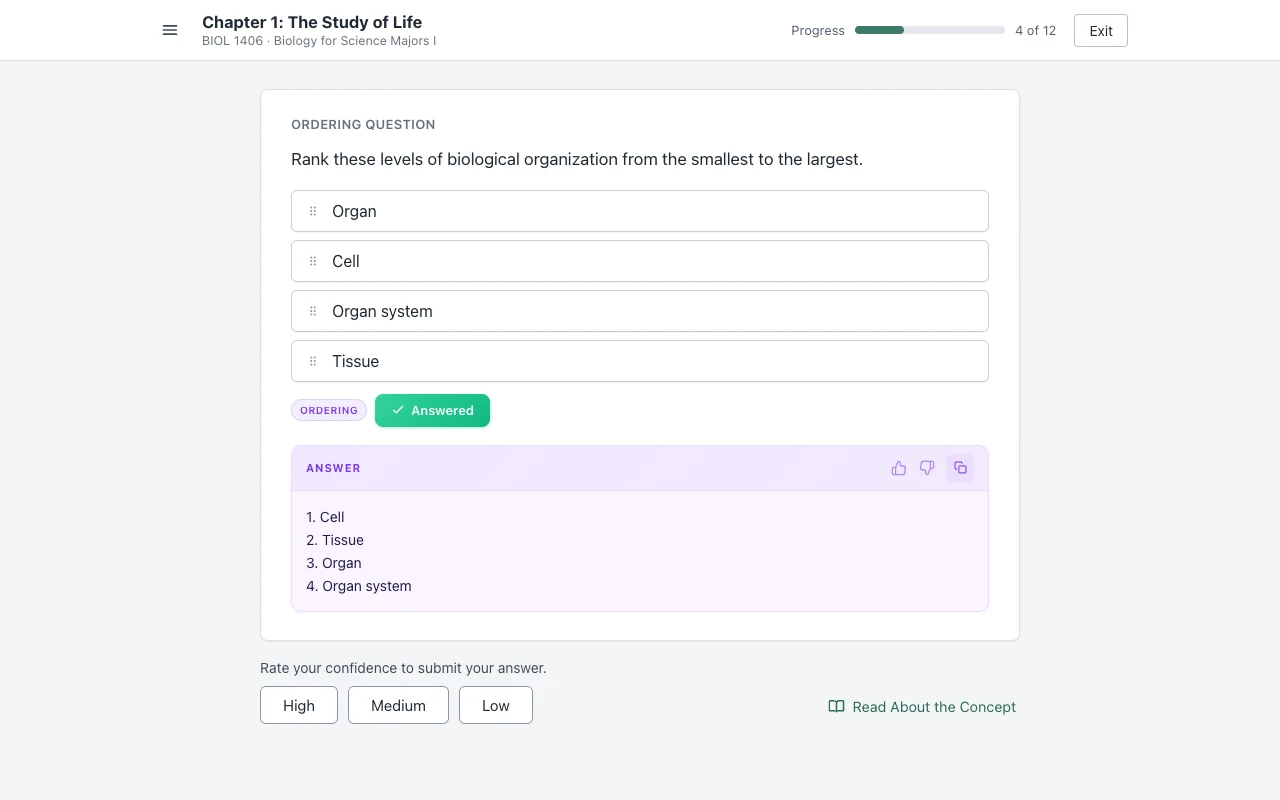
Ordering
The answer gives the order as a numbered list.
Ordering
Fill in the blank
SmartBook can also show rarer item types, such as graphing or drawing. On those the extension says "This question type isn't supported yet." instead of a guess.
Not an auto-solver
It shows the answer and stops there: it never clicks an option, a confidence button or Next for you.
Auto-solvers take over the page. They pick the answers, click the confidence buttons and move to the next question on their own, for the whole assignment. You see none of it, and you cannot stop a wrong answer before it is submitted.
An auto-solver
- Picks and fills the answer for you.
- Clicks High, Medium or Low for you.
- Moves on to the next question by itself.
- A wrong answer is submitted before you see it.
Canvas Quiz Solver
- Shows the answer in the page, under the question.
- You pick the option yourself.
- You rate your confidence, and that submits it.
- You can skip an answer that looks wrong.
Looking for SolveMyBook? It is discontinued. See what still works on SmartBook now, or compare every option in the best AI for McGraw Hill.
Turn it on in three steps
Add the extension, open a SmartBook assignment, and click "Keep it on for this site" once.
- Add to Chrome. It is free to install, and you get free answers to try it.
- Open your SmartBook assignment from Connect or from your course page.
- Click the extension icon, then "Keep it on for this site". Chrome asks once for that site. After that it is on for every assignment there.
SmartBook support is in beta. The same extension also works on McGraw Hill Connect homework and quizzes and on Canvas quizzes. It stays off on proctored exams.
One plan for SmartBook, Connect and Canvas
Unlimited answers are $14.99 a month, or $48.99 every 4 months, on the same account you use for Canvas.
The free answers can run out in the middle of an assignment. Activate for unlimited answers, so SmartBook never stops you halfway.
Lock this price for life.
$12.25/month, billed every 4 months.
You save $10 a semester.
Renews every 4 months. Cancel anytime.
Free answers can run out mid-assignment Unlimited is $14.99/month
7-day money-back guaranteeNot happy? Email support@canvasquiz.com within 7 days of your first payment for a full refund.
Already subscribed? Sign in
SmartBook questions, answered
How are McGraw Hill SmartBook assignments graded?
SmartBook keeps asking about each concept until you show you know it, and the assignment is complete when you have worked through every concept it covers. McGraw Hill says your score is the percent complete on the due date, as the progress bar shows. After the due date the assignment turns into Recharge, and that work does not change your score. How much a SmartBook assignment counts toward your grade, and whether late work counts, is set by your instructor in Connect. More in how SmartBook is graded and SmartBook Recharge, explained.
How do I finish a McGraw Hill SmartBook assignment fast?
Cut the time you spend looking things up. With Canvas Quiz Solver the answer shows above the confidence buttons, so each question is read, pick, rate, next, with no second tab. Right answers also mean fewer extra questions, because SmartBook asks more about a concept when you miss it. More in how to finish SmartBook fast.
Does McGraw Hill SmartBook detect cheating?
McGraw Hill's proctoring service is for Connect exams, and we found no proctoring on SmartBook in McGraw Hill's documents. What SmartBook logs about your session is not documented by McGraw Hill. Our guide on whether SmartBook detects cheating goes through it, and our guide on whether McGraw Hill Connect detects cheating covers what instructors can see, with sources.
What happened to SolveMyBook?
SolveMyBook is discontinued. Its website now shows one line: "This website and the associated browser extension have been discontinued." Canvas Quiz Solver works on SmartBook today, and it shows the answer instead of clicking through the assignment for you. More in SolveMyBook alternatives.
Does it work on the "Read About the Concept" reader?
No. It answers SmartBook questions, not the eBook. The reading steps are not questions, so no answer shows there. When you go back to the questions, the answers show again.
Do I still have to rate my confidence?
Yes. In SmartBook the High, Medium or Low button is what submits your answer, and you click it yourself. The answer shows above those buttons, so you see it before you commit.
Does it work on McGraw Hill Connect assignments too?
Yes. The same extension and the same plan work on Connect homework and quizzes in the ezto player (beta), and on Canvas quizzes.
Does it work on proctored exams?
No. On a proctored exam (Proctorio and similar) the extension stays off. The popup says "Not available on proctored exams." and nothing shows on the page.
Is it free?
You get free answers to try it on a real assignment. Unlimited answers are $14.99 a month, or $48.99 every 4 months, with a 7-day money-back guarantee. One plan covers SmartBook, Connect and Canvas.
Your next SmartBook, with the answers in the page.
Every question shows its answer above the confidence buttons. You pick, you rate, you move on.