Can McGraw Hill SmartBook detect cheating?
SmartBook has no documented cheating detector, but it logs how you answer: time on questions, accuracy and confidence.
- We found no proctoring for SmartBook in McGraw Hill's documents. Proctorio is for Connect exams.
- Your instructor sees your progress, time spent, time on questions and accuracy.
- Every answer carries the High, Medium or Low confidence you picked, and whether it was right.
- McGraw Hill documents no tab, copy and paste or screenshot log for SmartBook.
- Auto-solvers stand out: answers in a second, the same rating every time.
Our pickCanvas Quiz Solver shows the answer above the High, Medium and Low buttons, inside SmartBook. You pick the answer and rate it yourself, so nothing is clicked for you.
The short answer
SmartBook is homework, not an exam. McGraw Hill's remote proctoring page names Proctorio for Connect and Respondus for ALEKS, and we found no proctoring for SmartBook in any McGraw Hill document. So nobody watches your screen while you work through a SmartBook assignment.
What SmartBook does is log the way you answer. McGraw Hill's SmartBook instructor overview says each question needs two things: you select an answer and you rate your confidence. Both go into the reports, with the time you took. That record is what an instructor would look at if something seemed off.
This guide covers SmartBook only. For Connect homework, quizzes and proctored exams, read does McGraw Hill Connect detect cheating?
What SmartBook records for your instructor
The SmartBook reports guide describes a dashboard made of tiles. Each tile opens a list of students, and each name opens a detail page.
| Report tile | What it shows |
|---|---|
| Assignment Progress | Who has not started, who is in progress and who is done, and each student's total progress. |
| Student Details | One student's progress, time spent and "learner metacognition" details. |
| Completion Time | Estimated time against actual time. Accuracy, including work in Recharge mode. "Time each student spent on questions", and who opened extra concept resources. |
| Learner's Metacognition | For each student, whether answers were right or wrong and the confidence chosen: High, Medium or Low. The instructor can download it. |
| Challenge Concepts | The concepts the class found hard. |
Connect's own Assignment Results report adds your score, start and finish times and attempts. Your instructor also sets how much a SmartBook assignment counts and whether late work counts.
One more rule changes what is worth doing. After the due date, SmartBook goes into Recharge mode, where McGraw Hill says you can keep practicing "but progress is no longer recorded". Work done there does not change your grade.
Tab switching, copy and paste and screenshots in SmartBook
None of the three appears in McGraw Hill's SmartBook reports. Here is what we found for each one.
- Switching tabs: McGraw Hill does not document a tab log for SmartBook. The SmartBook main code file has one tab-visibility listener, and it only re-checks the page's own timers. The page also loads analytics tags, and McGraw Hill does not document what they collect. More in can McGraw Hill detect switching tabs?
- Copy and paste: SmartBook question text cancels cut, copy and paste. In the code we read, that block only stops the action and sends nothing. More in can McGraw Hill see if you copy and paste?
- Screenshots: McGraw Hill does not document screenshot detection for SmartBook. A screenshot tool runs outside the page.
"Not documented" is not the same as "not possible". The code can change after the date we checked, so nobody can honestly promise you either way.
Why auto-solvers stand out
An auto-solver takes over SmartBook. It picks the answer, clicks a confidence button and moves to the next question, for the whole assignment, faster than anyone can read.
Now look at what the reports keep for every answer: whether it was right, the confidence chosen and the time on questions. A run of answers that take a second each, all right and all rated "High", is a pattern. The Completion Time tile even puts each student's actual time next to the estimated time. McGraw Hill does not document an alert for this, but an instructor who opens the report can see it.
McGraw Hill also goes after SmartBook tools. In 2024, the developer of SmarterBook got a cease-and-desist letter from McGraw Hill's law firm and shut the extension down in March. It only added Google, Quizlet and AI buttons above each question, and the letter still said it was "facilitating cheating by students".
Answers you still pick yourself
Canvas Quiz Solver is a Chrome extension that shows the answer inside SmartBook, right above the High, Medium and Low buttons. It never clicks an option, a confidence button or Next for you. You read the answer, pick it, rate your confidence and move on, so your times are your own reading and clicking times.

- No second tab, no copy, no screenshot. It reads the question on the page.
- You stay in control. You can skip an answer that looks wrong before you rate it.
- Six question types. Multiple choice, true or false, multiple select, fill in the blank, matching and ordering. Rarer types show "This question type isn't supported yet."
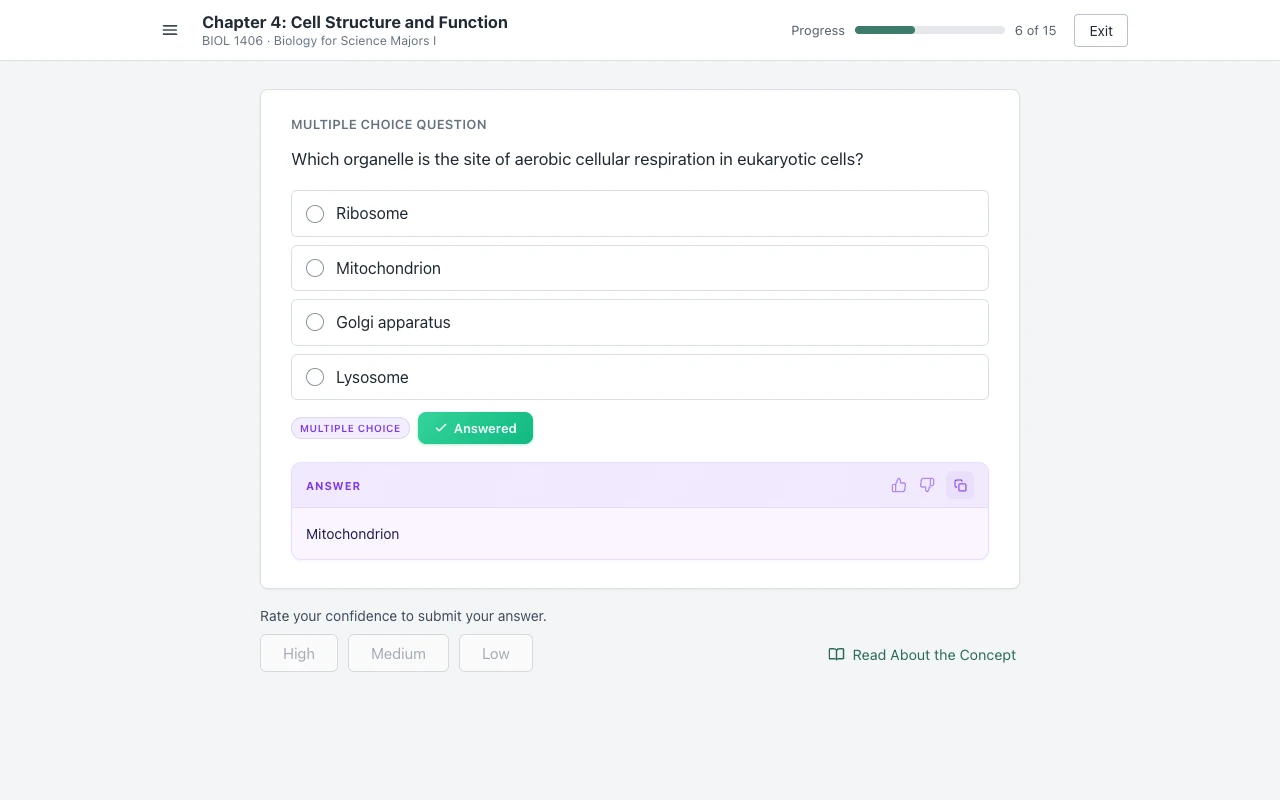
SmartBook support is in beta, and the same plan covers Connect and Canvas. Answers come from AI and can be wrong, so read each one before you pick it. Setup is one step: open an assignment, click the extension icon and tap "Keep it on for this site". You get free answers to try, and Unlimited is $14.99 a month. More on the SmartBook page, or see how to finish SmartBook fast.
Sources we checked
- SmartBook Reports in Connect (McGraw Hill, PDF), checked 2026-10-21
- SmartBook 2.0 Instructor Overview (McGraw Hill, PDF), checked 2026-10-21
- Connect Reports: Assignment Results, Student Performance, At-Risk Students (McGraw Hill, PDF), checked 2026-10-21
- Remote Proctoring and Browser Locking for Online Testing (McGraw Hill), checked 2026-10-21
- SmartBook main code file (McGraw Hill, learning.mheducation.com), checked 2026-10-21
- I got a cease and desist letter (Micah Lindley, the SmarterBook developer, November 2024), checked 2026-10-21
Common questions
Does McGraw Hill SmartBook detect cheating?
SmartBook has no documented cheating detector, and we found no proctoring for SmartBook in McGraw Hill's documents. It does log your progress, time on questions, accuracy and the confidence you picked, and your instructor can see all of it.
Can SmartBook detect switching tabs?
McGraw Hill does not document this. Its SmartBook reports list no tab or focus log. In the SmartBook code we read, the one tab-visibility listener only re-checks the page's own timers.
Can SmartBook detect copy and paste?
McGraw Hill documents no copy log. SmartBook blocks copying instead: the question text cancels cut, copy and paste, and in the code we read that block sends nothing anywhere.
Can SmartBook detect screenshots?
McGraw Hill does not document screenshot detection for SmartBook. A screenshot app runs outside the browser page.
Can a SmartBook solver be detected?
McGraw Hill does not document a check for extensions. What it does log is time and confidence on every answer, so a bot that answers in a second and rates everything the same leaves a clear pattern. An answer you read, pick and rate yourself takes your own normal time.
Does SmartBook track how long you take?
Yes. The SmartBook reports guide lists time spent on the assignment and the time each student spent on questions, next to the estimated completion time.
Does SmartBook Recharge count?
No. McGraw Hill says that after the due date the assignment enters Recharge mode, where you can keep practicing but progress is no longer recorded.
SmartBook answers, and you still click every one
The answer shows above the confidence buttons. You pick, you rate, you move on. Start free.