How to finish McGraw Hill SmartBook assignments fast
SmartBook is slow because it is built to repeat. Every wrong answer brings more questions, so the fastest way through is to miss fewer of them.
- Your progress counts concepts, not questions. McGraw Hill says a concept needs at least two right answers before it is marked complete.
- A question you miss comes back later in the same session, sometimes as a different version.
- Several misses on one concept can force a pause and send you to the reading.
- The time estimate counts questions only. Reading time is not in it, and McGraw Hill says your time will vary.
- There is no time limit in McGraw Hill's SmartBook guides. The limit is the due date.
Our pickCanvas Quiz Solver shows the answer inside SmartBook, right above the High, Medium and Low buttons. No second tab, no screenshots. You pick the answer and rate your confidence yourself.

Why SmartBook takes so long
SmartBook is an adaptive assignment. McGraw Hill's student overview calls it "an adaptive reading experience that personalizes learning to meet your individual needs". In practice, the number of questions is not fixed. It depends on how you answer.
Four rules from McGraw Hill's own guides decide how long you stay in an assignment:
- Progress counts concepts. The 2023 Student Guide to Using Connect and SmartBook says the progress bar splits your assignment into concepts not started, in progress and completed. It also says: "You'll need to successfully answer at least two questions related to a concept before that concept is marked complete in the Progress bar."
- Wrong answers come back. McGraw Hill's SmartBook assignment tips say "The number of questions you get is influenced by your accuracy." A question you miss "will be repeated later in the same session", and it may come back as a variant of the same learning objective.
- Struggling forces a pause. The SmartBook 2.0 instructor overview says that when students are clearly struggling with a concept, SmartBook "will force a pause in the questions" and send them to "Learn About This". You read that part before you get more questions.
- Every question has two steps. The student overview says that to complete a question, you check your answer AND rate your confidence. In SmartBook, the High, Medium or Low click is what submits the answer.
So one missed question costs more than one question. It costs the repeat, the extra right answer the concept still needs, and sometimes a trip back to the reading.
The length is also your instructor's choice. McGraw Hill's SmartBook user guide says the instructor picks the chapters and the concepts. An Assignment Scope slider then removes lower-priority learning objectives or keeps them in. A long SmartBook is long because of those settings, not because something is broken.
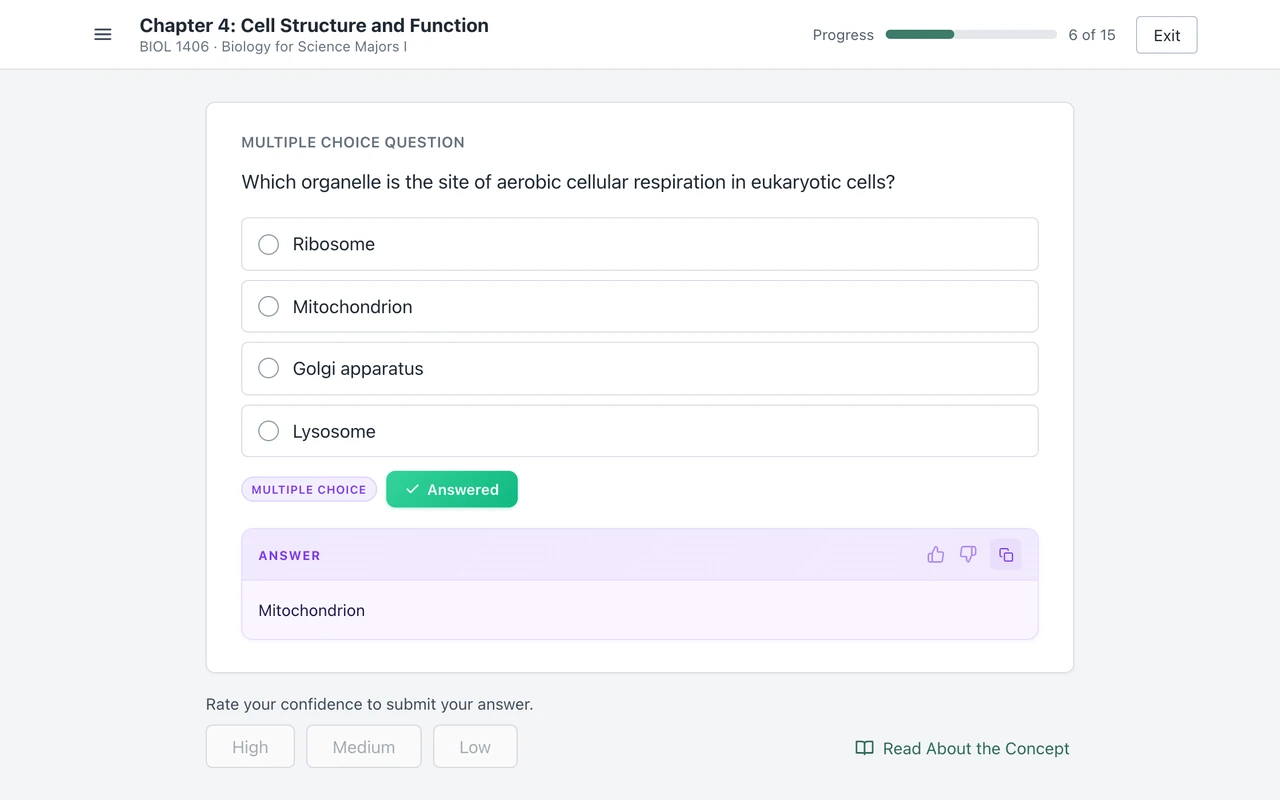
How long a SmartBook assignment takes
McGraw Hill does not publish one number for all assignments. It gives an estimate for each one, and the estimate leaves things out.
- The instructor sees an estimate. When the instructor builds the assignment, the SmartBook 2.0 user guide says the Assignment Scope shows "the estimated assignment time completion", and it shrinks as concepts are removed.
- The estimate is for questions only. The newer user guide lists three notes: "Time estimates reflect question-answering time only", "Reading time is not included" and "Individual completion times will vary".
- You see it too. The 2023 student guide says that when SmartBook loads, you see the due date, the "expected duration of the task" and the number of concepts.
Read that number as a floor. If you read the chapter first, add your reading time on top. If you miss a lot of questions, add the repeats and the forced reading too.
Your instructor sees how long it really took. The SmartBook dashboard has a Completion Time tile that sorts students into less time, typical time and more time. McGraw Hill's SmartBook reports guide says its detail view includes the "time each student spent on questions".
What actually makes it faster
Each tip below comes from how McGraw Hill says SmartBook scores and repeats. None of them skips anything you are asked to do. The full scoring rules are in how SmartBook is graded.
- Check the estimate and the due date first. Your score is "the percentage complete on due date as indicated by the progress bar", says the student overview. Start early enough to finish before that date.
- Start with the questions if you know the topic. The welcome page offers Start Reading or Start Questions. McGraw Hill recommends reading first for "the most effective learning experience", but the choice is yours.
- If you read, read the highlights. The highlighted parts are the concepts your instructor picked. The student overview says reading the whole chapter gives full context, but "you may want to focus on the highlighted content".
- Treat every miss as two extra questions. A concept needs at least two right answers. Each miss in between adds a repeat, so a careful answer is faster than a quick guess.
- Rate your confidence, then move on. The student overview says confidence "does NOT affect your progress bar". McGraw Hill asks for an honest rating because it helps SmartBook choose what to show you, so pick one and keep going.
- Read the correct answer after a miss. The 2023 guide says that if you answer wrong, "you will see the correct answer to help you". A version of that question is coming back, so the answer you just saw saves you a second miss.
- When SmartBook sends you to read, read only that part. The 2023 guide says SmartBook takes you "directly to the highlighted concept". When you are done, click Back to Questions.
- Finish before the due date, then stop. The grading and Recharge guide says your score locks in when you complete the whole assignment or when the due date arrives, whichever comes first. Work after that is Recharge, and it does not change your score.
Can you leave and come back? Yes. McGraw Hill's SmartBook 2.0 assignment overview says you can exit at any time with Exit Assignment, and the grading guide says Start Reading takes you back to where you left off. McGraw Hill does not document whether a half-done concept keeps its partial progress, so finish the concept you are on before you leave when you can.
Is SmartBook timed?
No time limit appears in McGraw Hill's SmartBook guides. They describe no clock on the assignment and none on each question. The limit that matters is the due date.
Other Connect assignments can be timed. McGraw Hill's Completing Assignments guide says "Your assignment may be timed, in which case the clock will still run even if you choose to Save and Exit the assignment." That line is about timed Connect assignments. The SmartBook guides do not mention a timer.
Time is still recorded. The instructor's SmartBook dashboard shows completion time and time spent on questions. The Learners' Metacognition report lists each answer as right or wrong, with the confidence you picked. A run that is very fast and perfect from start to finish stands out in those reports. More in does SmartBook detect cheating?
The fastest way: the answer above the confidence buttons
Most of the time in SmartBook goes to the questions you miss. Each miss brings a repeat, and a few misses in a row bring a forced trip to the reading. Canvas Quiz Solver cuts that loop. It shows the answer to each question inside SmartBook, right above the High, Medium and Low buttons, so you see it before you commit.
Each question becomes four quick steps:
- Read the answer under the question.
- Pick it yourself: click the option, tick the boxes, type the word or set the order.
- Rate your confidence: High, Medium or Low. That click submits the answer.
- Go to the next question.
It reads the six question types SmartBook uses: multiple choice, true/false, multiple select, fill in the blank, matching and ordering. On anything else, such as a graphing item, it says "This question type isn't supported yet." instead of a guess. It does not answer the reading steps, because they are not questions.
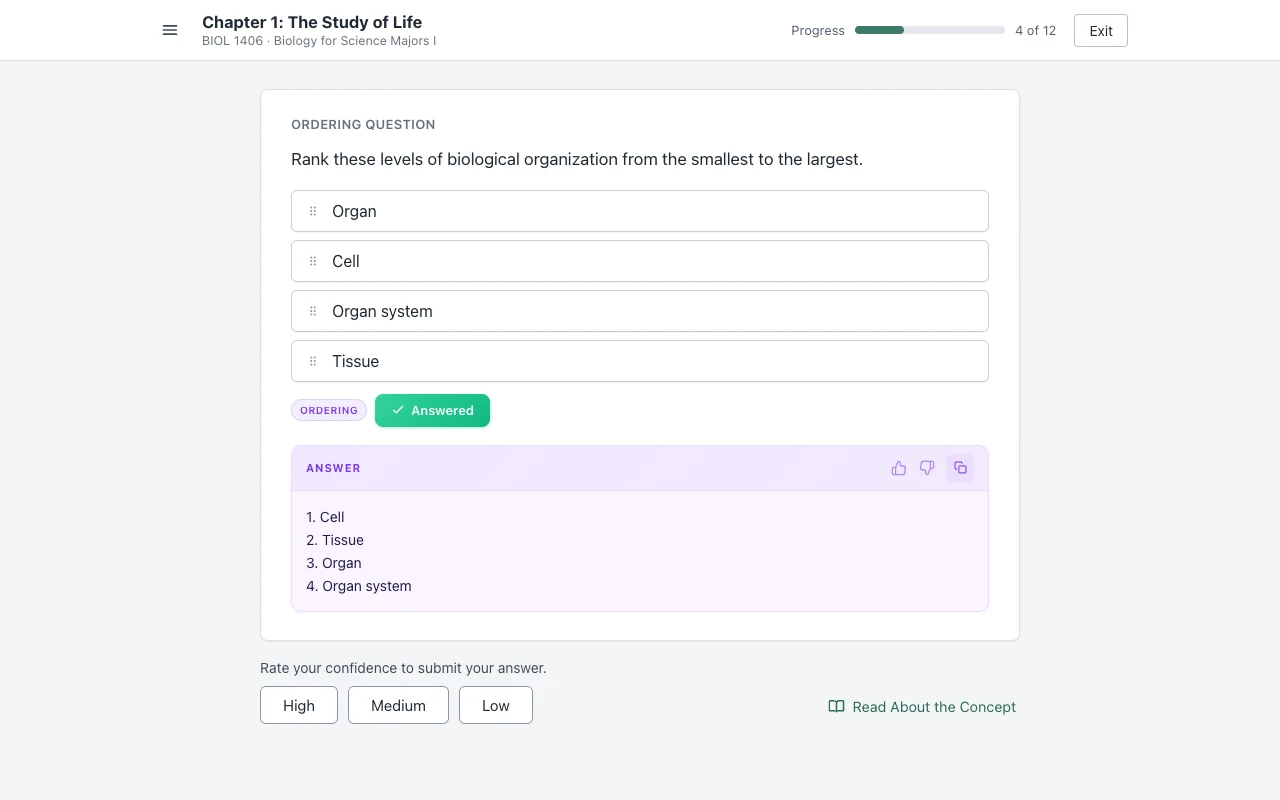
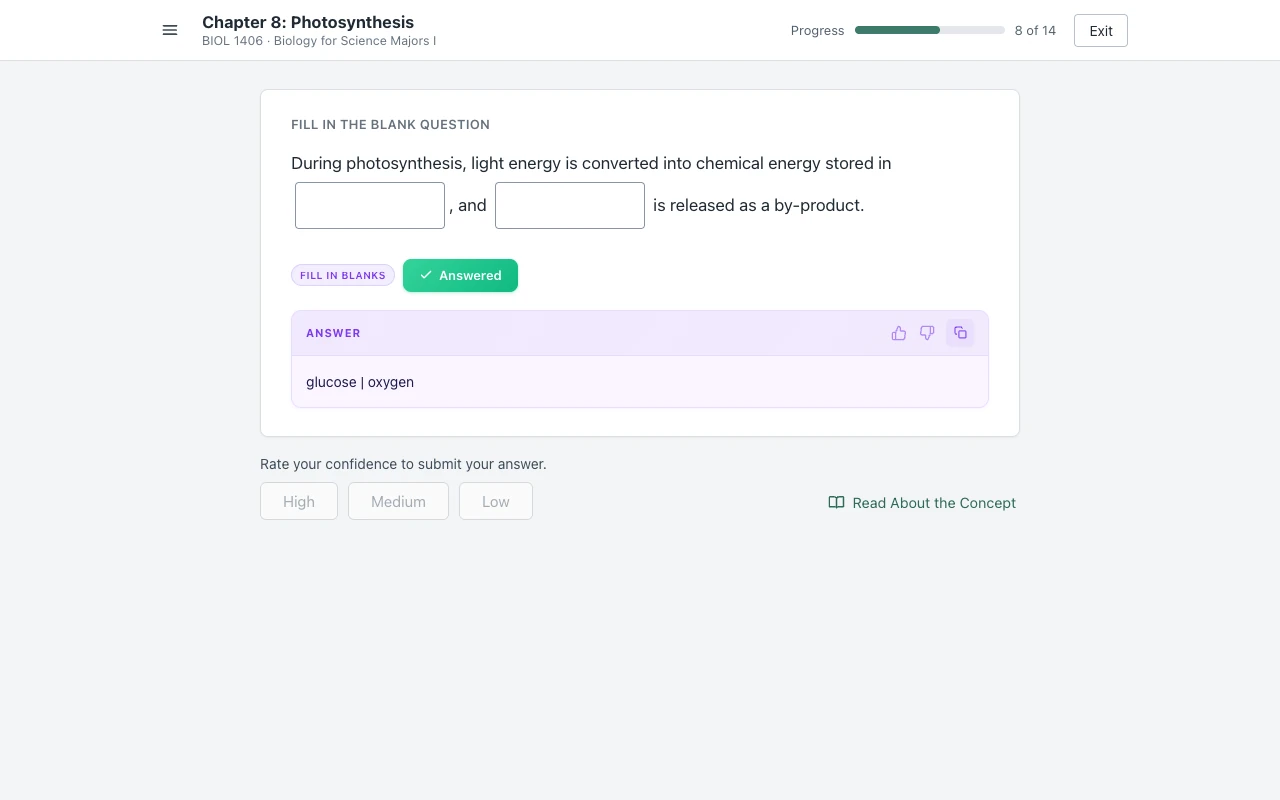
There is no second tab, no screenshot and no copy and paste. It never clicks, types or submits for you. Answers come from AI and can be wrong, so read each one before you pick it. Setup is one step: open a SmartBook assignment, click the extension icon and tap "Keep it on for this site". It is the same account and plan as on Canvas and Connect, and you get free answers to try it.
Auto-solvers that click for you
Some tools go further. They pick the answer, click a confidence button and move to the next question on their own, for the whole assignment. Open-source projects such as auto-mcgraw work this way, and we compare them in Canvas Quiz Solver vs auto-mcgraw.
Hands-off sounds faster, but it has three costs:
- You do not see a wrong answer before it is submitted. Each wrong answer still brings a repeat, so the script runs longer than you expect.
- The reports show the pattern. Your instructor sees completion time, time on questions, and every answer with the confidence picked. An assignment finished at script speed stands out next to a class that reads.
- McGraw Hill has gone after them. The developer of SmarterBook, an older SmartBook extension, wrote that McGraw Hill's law firm sent him a cease-and-desist letter in February 2024. He shut the extension down in March 2024. SolveMyBook is discontinued too; see SolveMyBook alternatives.
Canvas Quiz Solver works the other way. It shows the answer and stops there. You pick, you rate your confidence, and you can skip any answer that looks wrong.
The slow part of SmartBook is the loop of misses and repeats. With the answer above the confidence buttons, each question is read, pick, rate, next, in the same tab.
Sources we checked
- SmartBook Overview - Student (McGraw Hill, PDF, updated April 2026), checked 2026-10-21
- The Student Guide to Using Connect and SmartBook (McGraw Hill, PDF, July 2023), checked 2026-10-21
- SmartBook - Assignment Tips (McGraw Hill support), checked 2026-10-21
- SmartBook 2.0 Instructor Overview (McGraw Hill, PDF), checked 2026-10-21
- SmartBook User Guide (McGraw Hill, PDF, September 2026), checked 2026-10-21
- SmartBook User Guide, SmartBook 2.0 edition (McGraw Hill, PDF), checked 2026-10-21
- SmartBook Reports in Connect (McGraw Hill, PDF, August 2026), checked 2026-10-21
- SmartBook: Grading and Recharge for Students (McGraw Hill, PDF), checked 2026-10-21
- SmartBook 2.0 Assignment Overview, Liberty University Digital Training Series (McGraw Hill, PDF), checked 2026-10-21
- Completing Assignments - Student (McGraw Hill, PDF), checked 2026-10-21
- "I got a cease and desist letter" (Micah Lindley, SmarterBook developer), checked 2026-10-21
Common questions
Why does SmartBook take so long?
Because it repeats. Progress counts concepts, and McGraw Hill says each concept needs at least two right answers. A question you miss comes back later in the same session, and several misses on one concept can force a pause and send you to the reading.
How long does a SmartBook assignment take?
It depends on the assignment. When SmartBook loads you see an expected duration, but McGraw Hill says the estimate counts question time only, not reading, and that individual completion times will vary. Every wrong answer adds time on top.
Is McGraw Hill SmartBook timed?
McGraw Hill's SmartBook guides describe no time limit on the assignment or on each question. The limit is the due date. Your time is still recorded, and your instructor sees completion time and time spent on questions.
Do I have to read the chapter in SmartBook?
Not first. The welcome page lets you pick Start Reading or Start Questions. If you miss several questions on one concept, SmartBook can pause the questions and send you to that part of the reading before you go on.
Does my confidence level change my SmartBook score?
No. McGraw Hill says the confidence level does not affect your progress bar, and your score is the progress bar on the due date. You still have to pick High, Medium or Low, because that click submits the answer.
Can I leave a SmartBook assignment and come back later?
Yes. You can exit at any time, and Start Reading takes you back to where you left off. McGraw Hill does not document whether a half-done concept keeps its partial progress, so finish the concept you are on when you can.
What is the fastest way to finish a SmartBook?
Miss fewer questions, because every miss brings a repeat. Canvas Quiz Solver shows the answer above the High, Medium and Low buttons in the same tab. You pick it and rate your confidence yourself.
Your next SmartBook, with the answers in the page
The answer shows above High, Medium and Low. You pick it, you rate it, you move on. Start free.