How McGraw Hill SmartBook is graded
SmartBook is graded on completion. Your score is how much of the assignment you complete by the due date, as the progress bar shows.
- McGraw Hill: "Your assignment score is the percentage complete on due date as indicated by the progress bar."
- The score locks in when you complete the whole assignment or when the due date arrives, whichever comes first.
- Your confidence rating does not move the progress bar, so it does not change your score.
- A wrong answer has no documented point penalty. It just means more questions before the concept counts.
- After the due date the assignment turns into Recharge, and that work does not change your score.
Our pickCompletion comes from right answers. Canvas Quiz Solver shows the answer inside SmartBook, right above the High, Medium and Low buttons. You pick it and rate your confidence yourself.
Short answer: completion by the due date
McGraw Hill states the rule in one line. Its SmartBook student overview says: "Your assignment score is the percentage complete on due date as indicated by the progress bar."
The grading and Recharge guide for students adds when the score stops moving. Your score locks in when you complete the whole assignment or when the due date arrives, "whichever happens first". The instructor's SmartBook user guide says grades post at one of two times: when you fully complete the assignment, or at the due date, "graded based on how much they have completed".
The points are your instructor's choice. The user guide tells instructors to set a point value, and McGraw Hill recommends points "to encourage students to complete them". So if you reach 80% by the due date, you get 80% of whatever the assignment is worth.
How completion is counted
Completion is counted in concepts, not questions. The 2023 Student Guide to Using Connect and SmartBook says the progress bar has three parts: concepts not started, in progress and completed. It also says you need to "successfully answer at least two questions related to a concept before that concept is marked complete". McGraw Hill's SmartBook 2.0 assignment overview puts it the same way: your score depends on "the number of concepts you have completed by the due date".
| What you do | Effect on your score | Source |
|---|---|---|
| Complete concepts before the due date | This is your score: the percentage complete on the due date. | Student overview |
| Rate your confidence | None. It "does NOT affect your progress bar", but you must give it to complete a question. | Student overview |
| Answer wrong | No point penalty is documented. The question comes back, and the concept takes longer to complete. | Assignment tips, 2023 guide |
| Read the chapter | Not scored by itself. Only completed concepts count. | Student overview |
| Work in Recharge | None. It "will not affect your original score". | Grading and Recharge guide |
| Work after the due date | Counts only if your instructor allowed late submissions. Otherwise the assignment is in Recharge. | User guide |
Does confidence affect your grade?
No. The student overview says it in capitals: "The confidence level does NOT affect your progress bar." Your score is the progress bar on the due date, so High, Medium or Low does not change your grade.
It is not optional, though. The same overview says that to complete a question, "you will check your answer AND rate your confidence in your answer". In SmartBook, the confidence click is what submits the answer.
Confidence does matter elsewhere. McGraw Hill's SmartBook assignment tips say an honest rating helps SmartBook "direct you to the materials you need to study". Your instructor also sees it in the Learners' Metacognition report, next to your accuracy. McGraw Hill does not document exactly how a High or a Low rating changes the questions you get next.
What wrong answers do
A wrong answer does not cost you points in any McGraw Hill guide we checked. It costs you time. Here is what happens, step by step:
- You get feedback right away. The 2023 guide says that if you answer wrong, "you will see the correct answer to help you".
- The question comes back. The assignment tips say a missed question "will be repeated later in the same session", sometimes as a variant.
- Several misses force a pause. The SmartBook 2.0 instructor overview says SmartBook "will force a pause in the questions" when you are clearly struggling, and sends you to "Learn About This" before more questions.
- The concept still needs its right answers. At least two, per the 2023 guide, before it counts as complete.
Wrong answers do show in reports. The SmartBook dashboard has a Challenging Concepts tile, which the user guide defines as concepts with class accuracy under 65%. The metacognition download lists which questions each student got right or wrong. To spend less time on repeats, see how to finish SmartBook fast.
Late submissions and the due date
The due date is the line. Before it, completed concepts count. After it, the score is locked.
- Late work is an instructor setting. The current SmartBook user guide lists "Allow Late Submissions" as optional, with an extension deadline the instructor picks.
- Recharge starts after the deadline. The SmartBook 2.0 user guide says assignments turn into Recharge once "the assignment due date (and extension date, if applied) has passed".
- Recharge does not count. The student grading guide says "Work completed in recharge mode will not affect your original score." A pop-up tells you this before you start.
- Finishing early opens Recharge too. If you complete the whole assignment before the due date, you can enter Recharge right away.
McGraw Hill's SmartBook guides do not document a late penalty, so check your syllabus or ask your instructor. Your instructor can see who submitted late: the dashboard sorts students into not started, in progress, submitted and submitted late. More on Recharge in SmartBook Recharge, explained.
What your instructor sees in SmartBook reports
Your instructor sees more than the grade. These are the SmartBook dashboard tiles McGraw Hill describes in its SmartBook reports guide and user guide.
| Report | What it shows |
|---|---|
| Assignment Progress | Who has not started, is in progress, submitted or submitted late, and each student's total progress. |
| Student detail | One student's progress, time spent and metacognition details. |
| Completion Time | Less, typical or more time than expected, "time each student spent on questions", accuracy, and who opened extra concept resources. |
| Learners' Metacognition | Each answer marked right or wrong, with the High, Medium or Low confidence picked. It can be downloaded. |
| Challenging Concepts | Concepts with class accuracy under about 65%, with sample questions. |
One detail confuses students. McGraw Hill's grading guide for instructors says the completion percentage in the dashboard includes work done in Recharge, for no credit. Your actual score, from before the due date, is in the Assignment Results report and the gradebook. If your course is linked to your LMS, the guide says the score appears there too. What SmartBook logs beyond these reports is covered in does SmartBook detect cheating?
What is SmartBook (and LearnSmart)?
SmartBook is McGraw Hill's adaptive reading assignment inside Connect. You read a chapter with the key concepts highlighted, then answer questions and rate your confidence on each one. McGraw Hill's Completing Assignments guide says you can also do SmartBook in the ReadAnywhere app, online and offline. Many McGraw Hill guides call the current version SmartBook 2.0.
LearnSmart is the older name. McGraw-Hill's 2013 press release, printed in full by Engadget, says LearnSmart launched in 2009 as its adaptive study tool, and SmartBook joined it in 2013 in the "LearnSmart Advantage" suite. The names still overlap: McGraw Hill's own 2023 student guide calls the SmartBook assignment a "LearnSmart assignment" in one step. If your syllabus says LearnSmart, look for the SmartBook assignment in Connect.
Get through it with the answer above the confidence buttons

Since the grade is completion, the only thing that slows you down is the questions you miss. Canvas Quiz Solver shows the answer to each SmartBook question inside the page, right above the High, Medium and Low buttons. You read it, pick it, rate your confidence and move on. Fewer misses mean fewer repeats, so you reach the end of the progress bar sooner.
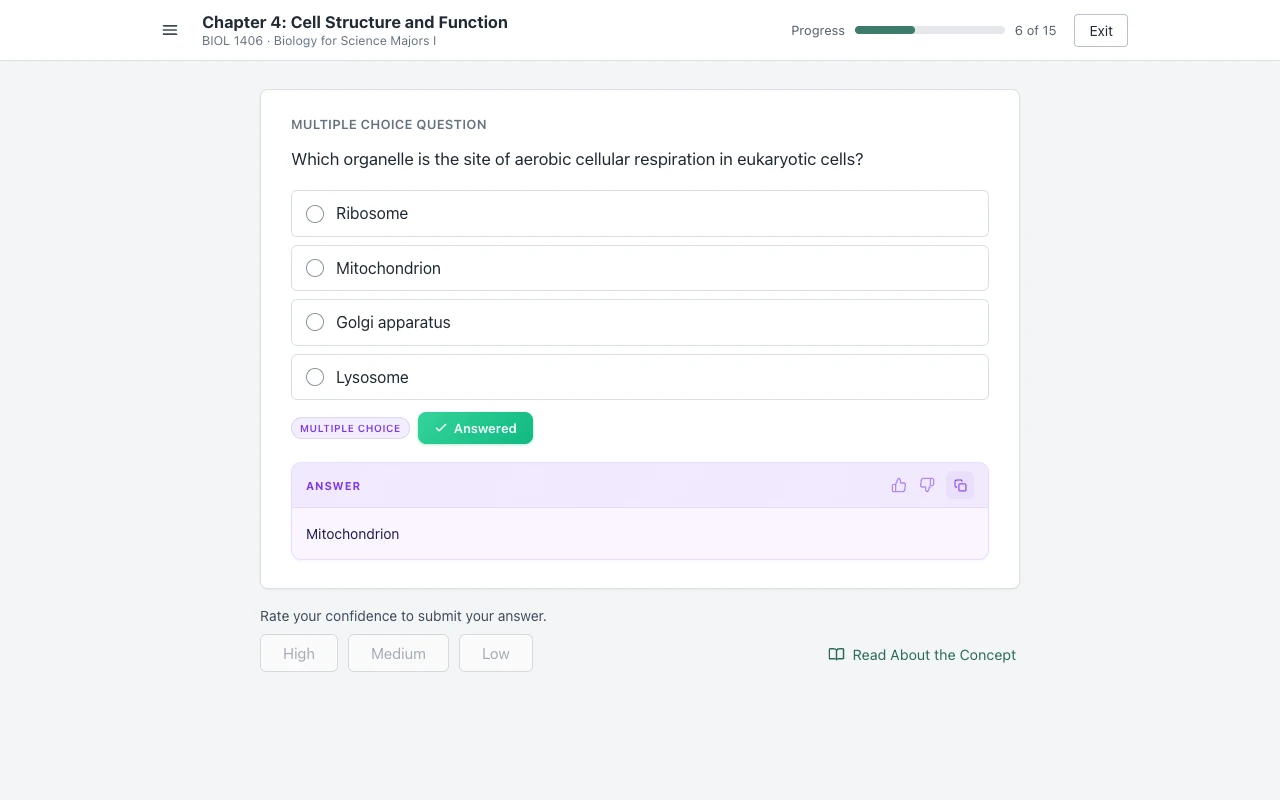
It reads multiple choice, true/false, multiple select, fill in the blank, matching and ordering. It never clicks, types or submits for you, and it opens no second tab. Answers come from AI and can be wrong, so read each one before you pick it. You get free answers to try it, and one plan covers SmartBook, Connect and Canvas.
Sources we checked
- SmartBook Overview - Student (McGraw Hill, PDF, updated April 2026), checked 2026-10-21
- SmartBook: Grading and Recharge for Students (McGraw Hill, PDF), checked 2026-10-21
- SmartBook: Grading and Recharge for Instructors (McGraw Hill, PDF, February 2024), checked 2026-10-21
- SmartBook User Guide, SmartBook 2.0 edition (McGraw Hill, PDF), checked 2026-10-21
- SmartBook User Guide (McGraw Hill, PDF, September 2026), checked 2026-10-21
- The Student Guide to Using Connect and SmartBook (McGraw Hill, PDF, July 2023), checked 2026-10-21
- SmartBook 2.0 Assignment Overview, Liberty University Digital Training Series (McGraw Hill, PDF), checked 2026-10-21
- SmartBook - Assignment Tips (McGraw Hill support), checked 2026-10-21
- SmartBook 2.0 Instructor Overview (McGraw Hill, PDF), checked 2026-10-21
- SmartBook Reports in Connect (McGraw Hill, PDF, August 2026), checked 2026-10-21
- Completing Assignments - Student (McGraw Hill, PDF), checked 2026-10-21
- McGraw-Hill reveals the SmartBook (Engadget, 8 January 2013, with McGraw-Hill's press release), checked 2026-10-21
Common questions
Is SmartBook graded on completion or accuracy?
Completion. McGraw Hill says your score is the percentage complete on the due date, as the progress bar shows. Accuracy matters only because each concept needs right answers before it counts as complete.
Does SmartBook take points off for wrong answers?
No point penalty appears in McGraw Hill's SmartBook guides. A wrong answer brings the question back later and delays the concept, so it costs time, not points.
Does confidence matter in SmartBook?
Not for your score. McGraw Hill says the confidence level does not affect your progress bar. You still have to rate it to submit each answer, and your instructor sees your confidence next to your accuracy in reports.
Does SmartBook save your progress?
Yes. Completed concepts stay complete, and Start Reading takes you back to where you left off. Your score is the progress you have when you complete the whole assignment or when the due date arrives.
What happens to a SmartBook after the due date?
It turns into Recharge mode. You can keep practicing, but McGraw Hill says work in Recharge will not affect your original score. If your instructor allowed late submissions, Recharge starts after the extension date instead.
Can you still get credit for a late SmartBook?
Only if your instructor turned on late submissions and set an extension date. McGraw Hill's SmartBook guides do not document a late penalty, so check your syllabus.
What is LearnSmart?
LearnSmart is McGraw Hill's older adaptive study tool, launched in 2009. SmartBook joined it in 2013, and McGraw Hill's own 2023 student guide still calls the SmartBook assignment a LearnSmart assignment in one step.
Finish your next SmartBook, start to end
The answer shows above High, Medium and Low. You pick it, you rate it, you move on. Start free.