SmartBook Recharge, explained
Recharge is SmartBook's review mode. It does not change your score, and it does not close: you can go back as often as you like.
- It opens after you complete the assignment, or after the due date for everyone.
- Your score locks at completion or at the due date, whichever comes first.
- Recharge is not points-based. Work done there does not affect your original score.
- Each session builds on your last one, so it is not a restart.
Our pickFor the SmartBook assignments that do count, Canvas Quiz Solver shows the answer right on the question page, above the High, Medium and Low buttons. You pick it and rate your confidence yourself.
Short answer
Recharge is a practice mode that SmartBook opens once the graded part of an assignment is over. McGraw Hill's SmartBook user guide calls it "a personalized study mode that helps students to review and improve their understanding of challenging concepts". You keep answering adaptive questions and you still get feedback, but nothing you do there changes your grade.
When Recharge opens
McGraw Hill names two ways in:
- You complete the assignment. The user guide says a student who completes the entire SmartBook assignment "will be able to enter Recharge mode".
- The due date passes. Once the due date, and any extension date, has passed, SmartBook assignments "turn into Recharge mode for all students".
You will see it in Connect. McGraw Hill's grading and Recharge guide for students says a RECHARGE label appears under the assignment name. When you open it, a popup says you will not get any more credit or progress. Click "Recharge", then "Start Reading" to go back to where you left off, or "Start Questions" to practice.
Does Recharge count toward your grade?
No. The student guide is direct: "Work completed in recharge mode will not affect your original score."
Your score is set before Recharge starts. SmartBook scores are "based on number of points accumulated before the due date", and the score "locks in" when you reach full completion or when the due date arrives, whichever happens first. The SmartBook student overview puts it the same way: after the due date, "scores are no longer recorded".
One detail surprises people. The student guide says the Completion and Time on Task figures in your results include work from before and after the due date. To see your real score, go back to your assignments and open "See report".
For how the graded part works, see how is SmartBook graded?
Does Recharge end? Does it mean restart?
McGraw Hill does not document an end date for Recharge. The user guide says a student "can return as many times as they want to Recharge, as long as the assignment due date has passed". It is "not points-based", and students "can answer as many questions as they would like".
It is not a restart, either. McGraw Hill says Recharge "provides a different learning path" depending on how much of the original assignment you attempted and which concepts you struggled with. Each new session "will consider their performance on their most recent session".
A session ends when you click "Exit Recharge". The user guide says you then see your time spent and accuracy, and you can continue or exit. Like the graded part, Recharge asks for two correct answers in a row on a concept, and sends you to the reading if you miss.
Using Recharge to study for the exam
Recharge is built for exam review. McGraw Hill even made a video of students explaining how they use it. Because it starts from the concepts you missed, a short Recharge session the night before is a fast way to find your weak spots.
Do not mix it up with a SmartBook Review assignment. The user guide says instructors can build Review assignments to help students prepare for a quiz or exam, and those have their own due date and points. Recharge has neither. For what Connect exams look like, see McGraw Hill Connect exams.
Answers in SmartBook
The SmartBook work that counts is the graded assignment before the due date. That is where Canvas Quiz Solver helps. It is a Chrome extension that reads the question on the SmartBook page and shows the answer right above the High, Medium and Low confidence buttons. You pick the answer and rate your confidence yourself, because it never clicks, types or submits.
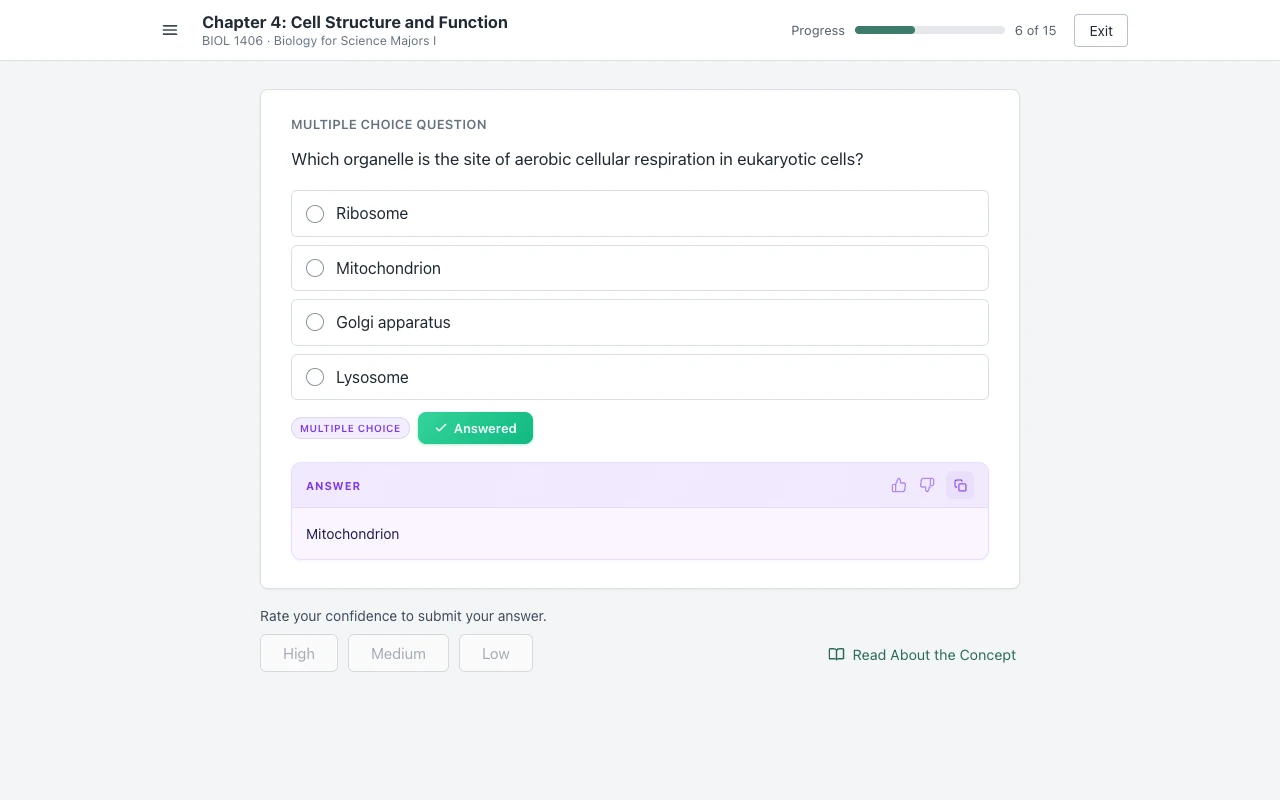
It reads SmartBook multiple choice, true or false, multiple select, fill in the blank, matching and ordering, in beta. It also works on Connect assignments and quizzes. We have not checked it inside a Recharge session yet, so this page does not promise it there.
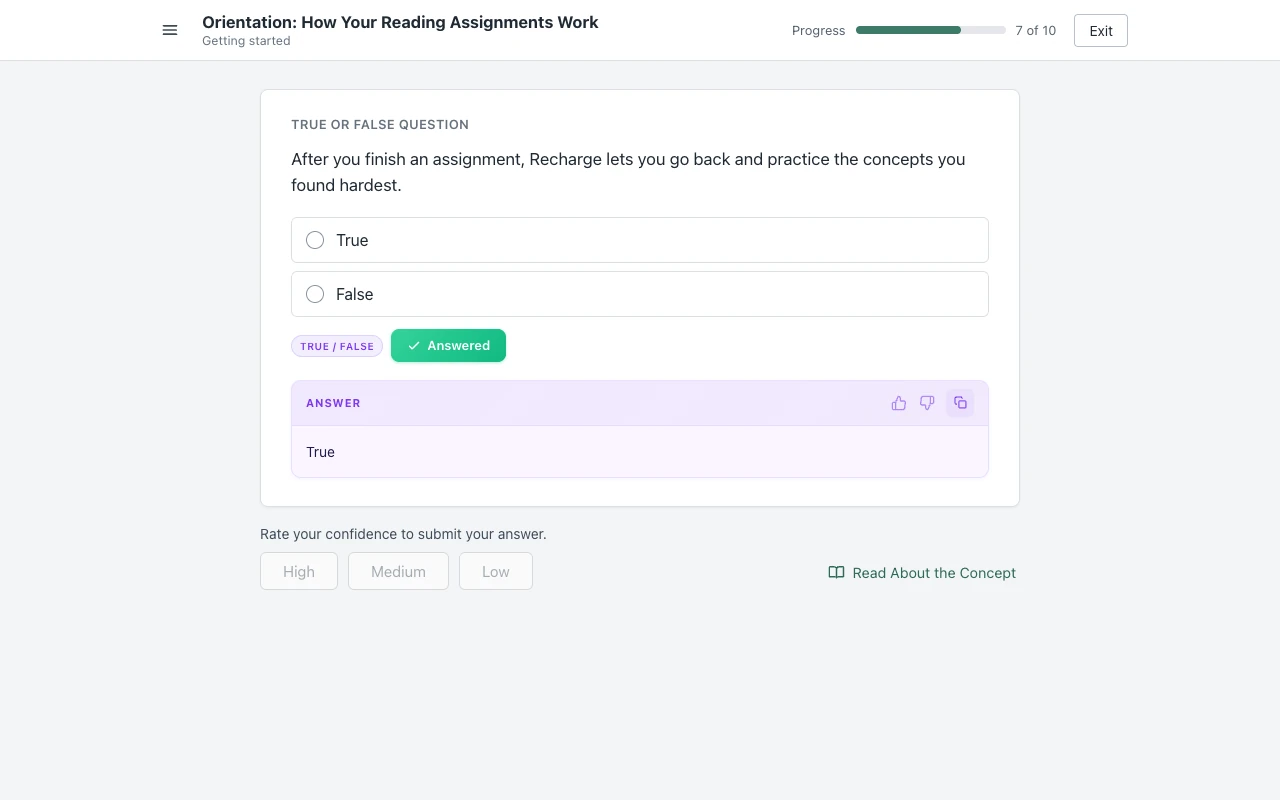
Answers come from AI and can be wrong, so check the ones that count. Setup is one step: open a SmartBook assignment, click the extension icon and tap "Keep it on for this site". It is the same account and plan as on Canvas. You get free answers to try, and Unlimited is $14.99 a month. It does not run on proctored exams.
Sources we checked
- SmartBook: Grading and Recharge for Students (McGraw Hill, PDF), checked 2026-10-21
- SmartBook User Guide, section "Recharge Mode" (McGraw Hill, PDF), checked 2026-10-21
- SmartBook Overview: Student (McGraw Hill, PDF), checked 2026-10-21
- How SmartBook Recharge Can Help You Study (McGraw Hill blog, video), checked 2026-10-21
Common questions
What does Recharge mean in McGraw Hill?
Recharge is SmartBook's review mode. It opens after you complete a SmartBook assignment or after the due date passes. You keep answering adaptive questions and get feedback, but your score no longer changes.
Does SmartBook Recharge count toward your grade?
No. McGraw Hill says work done in Recharge mode will not affect your original score. Your score locks when you complete the assignment or when the due date arrives, whichever comes first.
Does SmartBook Recharge end?
McGraw Hill does not document an end date. Its user guide says you can return to Recharge as many times as you want once the due date has passed. You leave a session with Exit Recharge.
Does Recharge mean you have to restart the assignment?
No. Recharge is optional practice, not a redo. McGraw Hill says each new session considers how you did in your last one, and it gives a different path depending on how much you attempted.
Why does my SmartBook say Recharge?
Usually because the due date has passed. McGraw Hill says the assignment then goes into Recharge mode, and Connect shows RECHARGE under its name. If you complete the whole assignment early, you can also enter Recharge.
Can you still get points after the due date in SmartBook?
Not through Recharge. McGraw Hill says Recharge is not points-based. If your instructor gave you an extension, the assignment turns into Recharge only after the extension date.
Answers inside SmartBook, above the confidence buttons
The answer shows on the question you are on. You pick it, you rate your confidence, you move on. Start free.