BetterBook alternative for McGraw Hill SmartBook and Connect
“BetterBook extension” is sold on two different websites as a SmartBook and McGraw Hill answer tool. Here is what each site says, what you actually install, and how it compares with Canvas Quiz Solver.
There is no Chrome Web Store listing called BetterBook. One site installs a general homework app; the other has no working download.
- betterbookextension.com sends you to SmartSolve - AI Homework Tutor: 30,000 users, rated 1.0 out of 5 from 144 ratings.
- SmartSolve answers in its own window after you highlight or snap a question.
- betterbookchromeextension.com promises auto-solve on McGraw Hill, but its buttons led to no download when we checked.
- Canvas Quiz Solver shows the answer inside the SmartBook or Connect page. You pick and submit.
Our pickCanvas Quiz Solver works on SmartBook and Connect (beta) and on Canvas quizzes. No second window, no screenshots, and you stay in control.
Add to Chrome - freeWhat BetterBook is
Two websites use the BetterBook name. They look different, make different claims, and do not link to each other. Neither one names the company behind it on its pages.
betterbookextension.com
Its page title is “BetterBook Extension - AI SmartBook Question Solver”. It says you can “solve your smartbook and other site questions”, and it shows four modes: Snapshot, Direct Integration, Highlight and Visual Mode. It claims “+100,000 students” and a “98.97% accuracy rate”, and says it cannot be detected. The page gives no source for those claims (betterbookextension.com).
Its Chrome button goes to a Chrome Web Store listing with a different name: SmartSolve - AI Homework Tutor. Its App Store and Google Play buttons go to SmartSolve apps too.
betterbookchromeextension.com
This site calls itself “The Best McGraw Hill Chrome Extension” and claims “10,000+ students”. It promises “Auto Solve”: “Automatically solve assignments with one click” (features page). Its steps say to create an account, install from the Chrome Web Store, then “let BetterBook do the rest”.
When we checked, every Get Started button on the page linked nowhere, so we could not install it. Its terms say the extension is free and “does not require user registration or account creation”, which does not match its own steps. A Chrome Web Store search for betterbook showed only an unrelated book recommendation extension.
How it works on SmartBook
The only BetterBook download we could reach is SmartSolve, so this is what SmartSolve does.
- Listing: 30,000 users, 1.0 out of 5 from 144 ratings, version 1.0.11, updated 24 August 2026. The developer is NIKNEA, LLC of La Jolla, California.
- How you ask: highlight a question and right-click “SmartSolve It!”, take a snapshot of the page, or use its one-click helper.
- Where the answer shows: in SmartSolve's own window, not under the question.
- Auto-answer: the listing does not claim it. We read the code of version 1.0.11 and found nothing written for SmartBook or McGraw Hill pages, and nothing that clicks answers for you.
- Price: no price on the BetterBook or SmartSolve pages. The SmartSolve terms describe a subscription that renews automatically.
A highlight or snapshot tool works on any page, but it works one question at a time. Every question means a selection or a capture, a wait, and a look at another window.
In SmartBook, each question has two steps: answer it, then rate your confidence (McGraw Hill's SmartBook guide). An answer in a separate window means switching back and forth on every one of them.
BetterBook vs Canvas Quiz Solver
| Canvas Quiz SolverThis extension | BetterBook (SmartSolve) | |
|---|---|---|
| Answer inside the SmartBook page | check_circle | No, own window |
| Connect assignments and quizzes | Yes (beta) | Highlight or snapshot |
| Canvas quizzes | check_circle | Highlight or snapshot |
| Clicks answers for you | Never | None found in code |
| Chrome Web Store name | Canvas Quiz Solver | SmartSolve |
| Price on the site | $14.99/mo or $48.99 per 4 months | Not shown |
Where each one does not run
Canvas Quiz Solver turns off on proctored exams: the popup says “Not available on proctored exams.” and nothing shows on the page. On Connect, accounting worksheets, the accounting tool, external tools and file uploads show “This question type isn't supported yet.”
BetterBook says nothing about proctored exams on either site, and the SmartSolve listing does not either. A highlight or snapshot tool reads whatever is on your screen, so it has no list of question types. Its highlight mode uses the right-click menu, and Connect quiz pages turn that menu off (see copying on McGraw Hill).
Canvas Quiz Solver on SmartBook
Canvas Quiz Solver shows the answer right on the SmartBook page, above the High, Medium and Low buttons. You read it, pick the option, choose your confidence, and go on. No highlight, no snapshot, no second window.

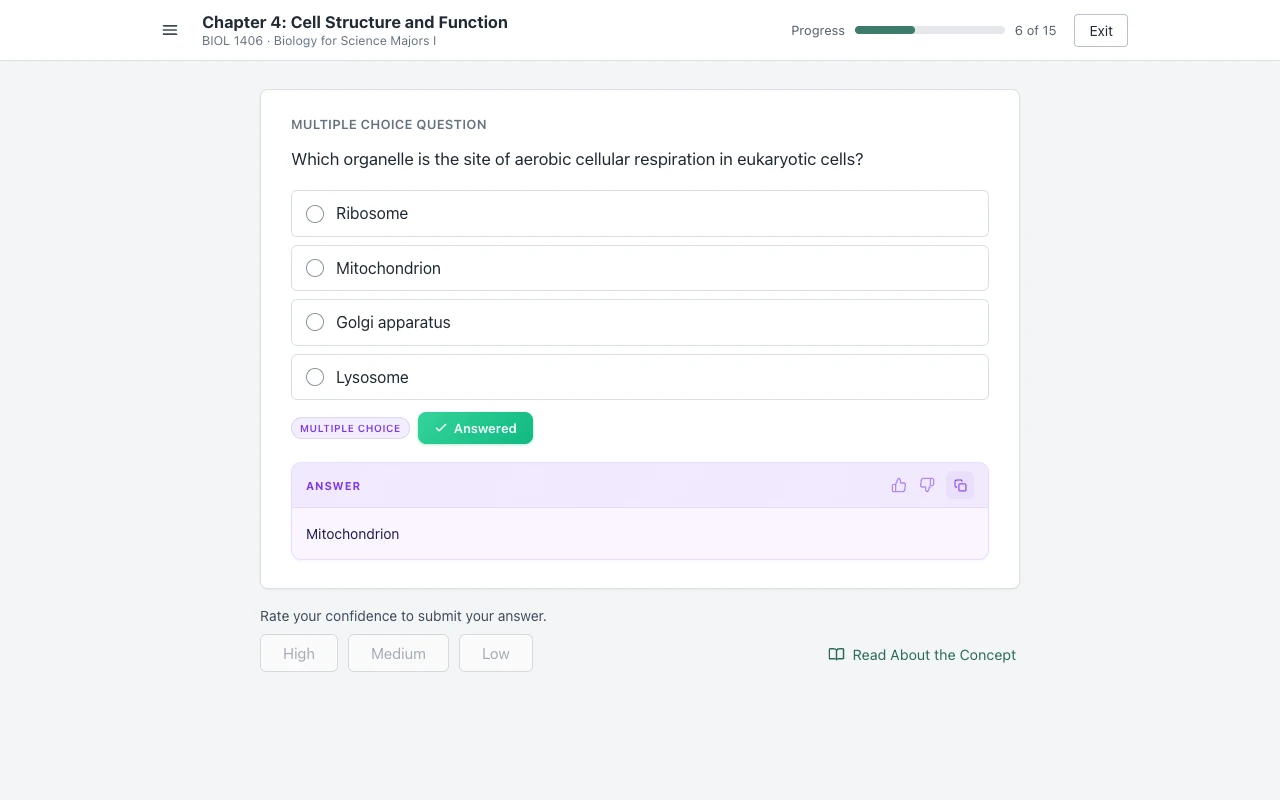
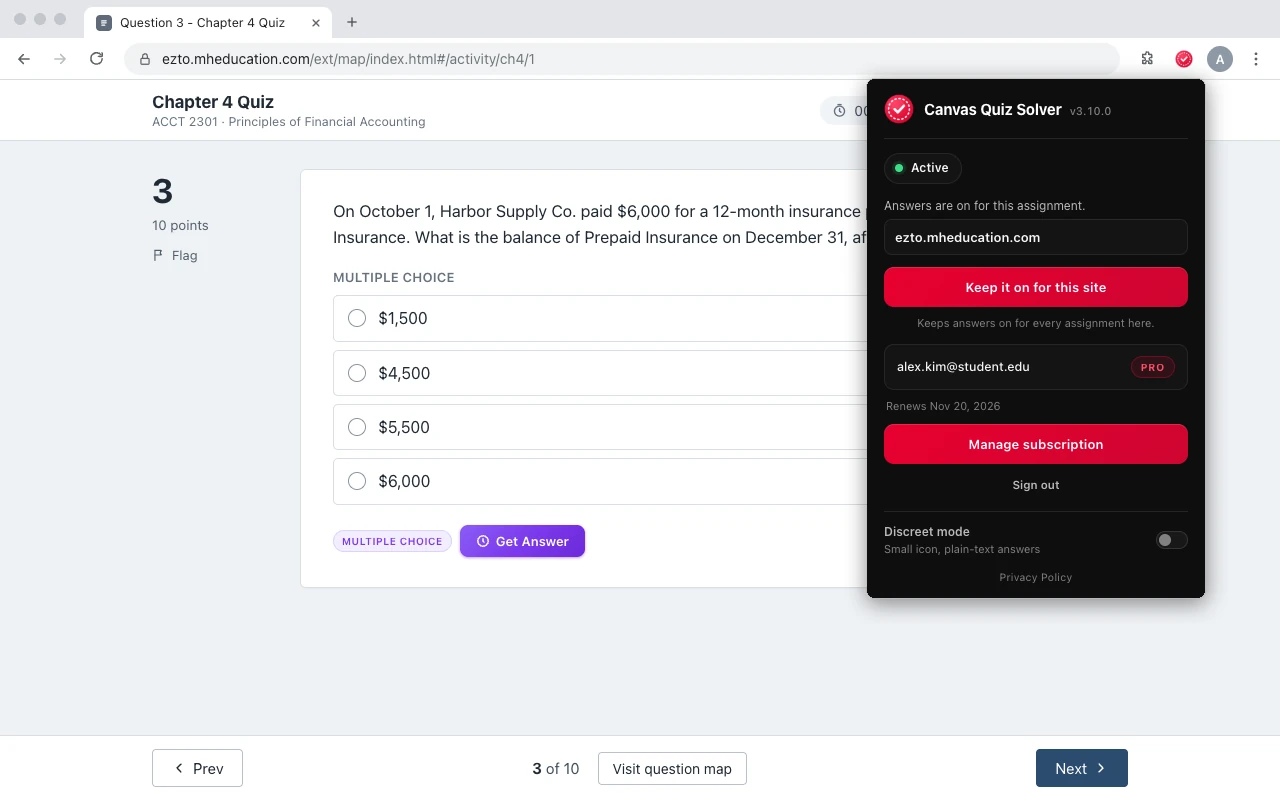
Setup is one tap on the first assignment.
- Connect assignments and quizzes: multiple choice, true/false, yes/no, check all that apply, fill in the blank, numeric, matching, ranking, short answer and essay.
- SmartBook: multiple choice, true/false, multi-select, fill in the blank, matching and ordering.
- Setup: add it from the Chrome Web Store, open the assignment, click the extension icon, and tap “Keep it on for this site”. After that it is on for every assignment there.
- Where it stops: it does not run on proctored exams. Accounting worksheets, the accounting tool, external tools such as virtual labs, SIMnet and ALEKS, file uploads and the older Connect player show “This question type isn't supported yet.”
- One account: the same plan covers Canvas quizzes too. It is in beta on McGraw Hill. Answers come from AI and can be wrong, so you stay the one who decides.
Full details: Canvas Quiz Solver on SmartBook and on McGraw Hill Connect.
Common questions
Is BetterBook on the Chrome Web Store?
Not under that name. A Chrome Web Store search for "betterbook" on 2026-10-21 showed one unrelated book recommendation extension. The Chrome button on betterbookextension.com opens the listing for SmartSolve - AI Homework Tutor instead.
Who makes the BetterBook extension?
Two sites use the name, and neither names a company on its pages. The Chrome, App Store and Google Play buttons on betterbookextension.com lead to SmartSolve apps; the Chrome Web Store lists NIKNEA, LLC of La Jolla, California as the SmartSolve developer. betterbookchromeextension.com names no company and gives a contact email only.
Does BetterBook auto-answer SmartBook?
betterbookchromeextension.com says it can "automatically solve assignments with one click", but its Get Started buttons led to no download when we checked. The extension that betterbookextension.com installs, SmartSolve 1.0.11, works by highlight, snapshot and a one-click helper, and we found no code in it that clicks answers or reads SmartBook pages.
Is BetterBook free?
betterbookextension.com says "Get Started - it's free" and shows no price. The SmartSolve terms describe a paid subscription that renews automatically. betterbookchromeextension.com says its extension is free and needs no account, while its own steps say to create an account.
What is a good BetterBook alternative for SmartBook?
If you want the answer inside the SmartBook page, Canvas Quiz Solver shows it above the High, Medium and Low buttons, and you pick and rate it yourself. It also works on Connect assignments and quizzes (beta) and on Canvas quizzes, with one account.
Sources
- betterbookextension.com and its download links, checked 2026-10-21
- betterbookchromeextension.com, its features and terms pages, checked 2026-10-21
- SmartSolve - AI Homework Tutor (Chrome Web Store) and version 1.0.11 of its code, checked 2026-10-21
- SmartSolve terms, checked 2026-10-21
- Complete a SmartBook 2.0 assignment (McGraw Hill, PDF)
Your SmartBook is due. Get the answer on the page.
One click. The answer shows above the confidence buttons. You pick and submit.