Can McGraw Hill Connect detect AI, Gemini or ChatGPT?
McGraw Hill documents no AI detector for Connect or SmartBook. On a clicked answer there is nothing to detect. Written answers and proctored exams are where AI use can show.
- McGraw Hill's AI pages describe its own AI study tools, not a tool that catches students.
- A multiple choice pick is just a click. Connect records the score, attempts and time, not where the answer came from.
- On written answers, an instructor can read the text, and the Writing Assignment tool has a plagiarism check.
- A web page cannot list your Chrome extensions, and McGraw Hill documents no extension check.
- On a proctored exam, Proctorio can disable extensions, close tabs and record your screen.
Our pickCanvas Quiz Solver brings the AI answer into the McGraw Hill page, under the question. No chatbot tab, no screenshots, and you pick the answer yourself. It works on Connect and SmartBook (beta) and stays off on proctored exams.
Short answer
We read McGraw Hill's AI pages, its instructor blogs about ChatGPT and its assignment guides. None of them describes an AI detector inside Connect or SmartBook. What McGraw Hill does document is a gradebook with timing, a plagiarism checker for one writing tool, and Proctorio for proctored exams.
The question type matters most. A picked option carries no writing style for any detector to judge. A paragraph you type does, and that is the only place AI detection has anything to work with.
What McGraw Hill says about AI
McGraw Hill is in favor of AI, as long as it is McGraw Hill's AI. Its AI approach page lists the AI Reader, a generative AI tool in the eBook that explains any passage you highlight, and Learning Coach, "a conversational tutor" in Connect. Its AI products page adds the Sharpen study app and AI literacy modules. Neither page mentions detecting AI use by students.
The blogs show how McGraw Hill thinks about ChatGPT:
- "McGraw Hill Higher Education, Academic Integrity, and Large Language Models" (July 2023): in McGraw Hill's survey, nearly 80% of instructors were acting or planning to act against AI cheating, and one action was "using or planning to use AI-detection tools". McGraw Hill's own steps were question pools, algorithmic variables, Proctorio and Respondus, and question types "incompatible with tools like AI chatbots". It also said it was still learning how AI tools can "be detected and limited where they can cause harm". Read it.
- "Assessing Student Submissions in the Era of ChatGPT" (May 2023): an instructor writes that if one student wrote an answer and another submitted a ChatGPT paragraph, "their instructor would not consistently be able tell the difference". Read it.
- "How to Avoid Students Cheating on Assignments in an Era of ChatGPT" (May 2023): the advice is to move tests into class, or to "embrace it" and use ChatGPT like a calculator. Read it.
- "Integrity in Online Assessments" (April 2026): a McGraw Hill and Proctorio session on "detecting AI-assisted cheating" and "securing online exams". The tool it names is Proctorio. Read it.
The pattern is clear. McGraw Hill's answer to AI is question design and proctored exams, not a detector on homework.
Written answers vs clicked answers
An AI detector reads text and guesses whether a person or a model wrote it. That only works when there is text to read.
| Answer type | What an AI detector can check | What McGraw Hill documents |
|---|---|---|
| Multiple choice, true or false, check all that apply, matching, ordering | Nothing. A clicked option has no writing style. | Score, attempts and time spent. SmartBook adds time on questions and your confidence. |
| Fill in the blank, numeric | Nothing useful. One word or one number looks the same from anyone. | The same reports. |
| Short answer, essay, Writing Assignment | The text. An instructor can read it or paste it into an outside AI detector. | The Writing Assignment guide describes an Originality checker that "searches the Internet for possible plagiarism" and compares work with earlier submissions. It does not mention AI. |
So on the question types that make up most Connect homework and all of SmartBook, AI detection has nothing to read. On written answers, the real test is whether the text sounds like you. Canvas Quiz Solver answers Connect short answer and essay questions too, so on those, use the answer as a draft and put it in your own words.
Gemini in Chrome and Google Lens
Gemini in Chrome and Google Lens run in Chrome's own interface, outside the McGraw Hill page. The page is not told that you opened them or what they read. The one visible side effect is the side panel, which makes the page narrower, and any page can notice a change in its width. McGraw Hill does not document a check for this.
The cost is time and back-and-forth. You open the panel, ask, read and then find the matching option yourself. For the screenshot version of this, see can McGraw Hill detect screenshots? On Canvas instead? See Gemini, Google Lens and AI browsers on Canvas.
Can McGraw Hill see your Chrome extensions?
A web page cannot ask Chrome for a list of your extensions. All it can notice is an extension that changes the page itself. McGraw Hill does not document any extension check for homework, quizzes or SmartBook.
We also read the code of both McGraw Hill question players: the Connect player build of August 2026 and the SmartBook build of 2026-10-13. Neither contains code that looks for extensions. Code can change with an update, so take this as what those builds do.
Canvas Quiz Solver adds its answer card to the page, under the question. It never clicks, types or submits, so every answer you send is your own click.
On proctored exams
Proctored exams are where McGraw Hill does lock things down. An exam with Proctorio carries a "Proctoring Enabled" label (see what Proctoring Enabled means). McGraw Hill's Proctorio features breakdown lists the settings an instructor can turn on:
- Disable extensions: "Prevents students from using other browser extensions".
- Disable new tabs and close open tabs at the start.
- Record screen: "Captures the student's desktop during the entire assessment".
- Record web traffic: "Records any web page visited during the assessment".
With those on, a chatbot tab or a Gemini panel would be on the recording. Canvas Quiz Solver does not run there: the popup says "Not available on proctored exams." and nothing shows on the page.
Using AI without a second tab
Most students who ask this already use AI and just want it to be less of a hassle. Canvas Quiz Solver puts the AI answer under the question, inside the McGraw Hill page. There is no chatbot tab to switch to and no screenshot to paste.
It works on Connect assignments and quizzes and on SmartBook, in beta. On Connect it reads multiple choice, true or false, yes or no, check all that apply, fill in the blank, numeric, matching, ranking, short answer and essay. On SmartBook it reads multiple choice, true or false, multiple select, fill in the blank, matching and ordering, and the answer sits above the confidence buttons. Connect worksheets, the accounting tool, external tools, file uploads and the older Connect player are not supported yet, and it says so on the question.
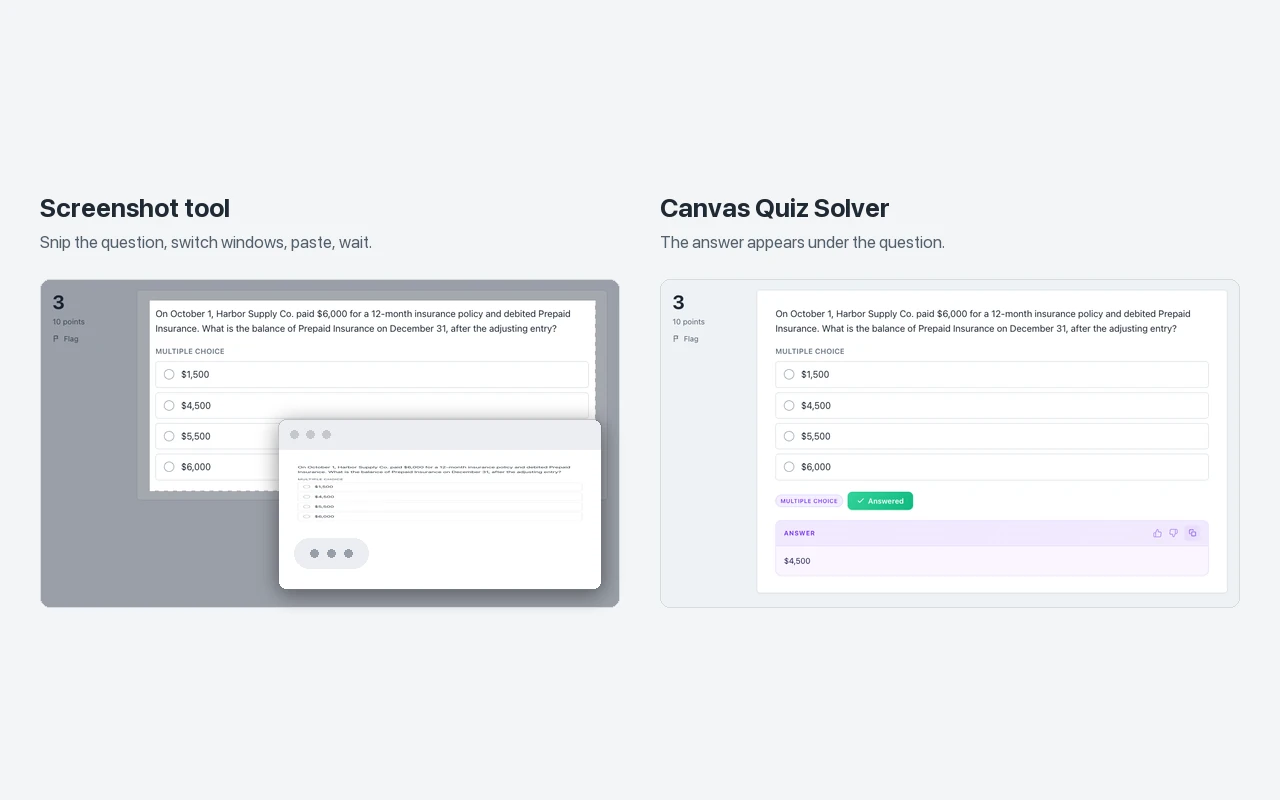
Answers come from AI and can be wrong, so check the ones that count. Setup is one step: open an assignment, click the extension icon and tap "Keep it on for this site". It is the same account and plan as on Canvas. You get free answers to try, and Unlimited is $14.99 a month.
Sources we checked
- McGraw Hill's Approach to Artificial Intelligence (McGraw Hill Trust Center), checked 2026-10-21
- AI That Amplifies Human Intelligence (McGraw Hill higher ed AI products), checked 2026-10-21
- McGraw Hill Higher Education, Academic Integrity, and Large Language Models (LLM) (McGraw Hill blog, July 2023), checked 2026-10-21
- Assessing Student Submissions in the Era of ChatGPT (McGraw Hill blog, May 2023), checked 2026-10-21
- How to Avoid Students Cheating on Assignments in an Era of ChatGPT (McGraw Hill blog, May 2023), checked 2026-10-21
- Integrity in Online Assessments (McGraw Hill blog, April 2026), checked 2026-10-21
- Writing Assignment User Guide (McGraw Hill, PDF), checked 2026-10-21
- Proctorio Features Breakdown (McGraw Hill, PDF), checked 2026-10-21
- McGraw Hill Connect + Proctorio Student User Guide (McGraw Hill, PDF), checked 2026-10-21
- Connect question player (app code of August 2026) and SmartBook player (app code of 2026-10-13), read 2026-10-21
On Canvas instead? See can Canvas detect ChatGPT?
Common questions
Does McGraw Hill have an AI detector?
McGraw Hill does not document one for Connect or SmartBook. Its Writing Assignment guide describes an Originality checker that compares writing with the internet and with earlier submissions, which is a plagiarism check. The guide does not mention AI.
Can McGraw Hill detect ChatGPT on multiple choice?
There is nothing in a clicked option to detect. A picked answer is the same click whether you got it from your notes, a friend or an AI. What Connect records is your score, attempts and time spent.
Can McGraw Hill detect Gemini?
McGraw Hill does not document this. Gemini in Chrome and Google Lens run in Chrome's own interface, not inside the McGraw Hill page. On a proctored exam, Proctorio can record your screen and the web pages you visit.
Can teachers tell if you used AI on a McGraw Hill written answer?
They can read it, and some run text through outside AI detectors. McGraw Hill's own instructor blog says a teacher would not consistently be able to tell an AI paragraph from a student's. McGraw Hill documents no built-in AI check.
Can McGraw Hill see your Chrome extensions?
A web page cannot list your installed extensions. McGraw Hill does not document an extension check, and we found no code that looks for extensions in either McGraw Hill question player. On a proctored exam, Proctorio can disable other extensions.
Does McGraw Hill use AI itself?
Yes. McGraw Hill builds AI into its own products, such as the AI Reader in the eBook and the Learning Coach tutor in Connect. McGraw Hill describes them as study tools, and none of them is described as a detector.
Can I use AI on McGraw Hill without a second tab?
Yes. Canvas Quiz Solver shows the answer under the question in the McGraw Hill page. You pick the answer and submit it yourself. It turns itself off on proctored exams.
AI answers inside McGraw Hill, without a chatbot tab
The answer shows under the question you are on. You pick it, you submit it. Start free.