How McGraw Hill Connect grades your homework
Connect has no single grading rule. Your instructor's policy settings decide how many attempts you get, which score counts, what Check my work costs and what late work loses.
- Attempts can be one, two, three or unlimited, and extra attempts can cost a percent of your score.
- In Canvas or another LMS, the instructor picks whether your best, last or average attempt is sent.
- Check my work shows right or wrong, not the answer, and can have a limit or a deduction.
- Late work can lose points per hour or per day, and Connect does not warn you about the penalty.
- An assignment you never submit can sync to your LMS as a 0 after the due date.
Our pickCanvas Quiz Solver shows a suggested answer under each Connect question before you submit, in the same tab. You compare it with your own work, pick and submit, without spending an attempt or a Check my work.
Short answer: your instructor's policy settings decide
Every Connect assignment has policy settings. McGraw Hill's guide to assignment policy settings lists five groups: basic, attempts, tolerances, resources and feedback. Each of the four assignment types (homework, practice, quiz and exam) starts with its own defaults, and your instructor can change any of them.
Two things follow from that. First, a classmate in another section can have different rules for the same chapter. Second, McGraw Hill's best practices guide says that if an instructor changes the policies after you start, the change applies to you only from your next attempt.
The quickest way to know your rules is the arrow at the end of the assignment line, which shows the assignment details. McGraw Hill's student guide asks you to read them before you click Begin.
Attempts and which score counts
McGraw Hill's page on policy settings for student attempts gives the instructor these choices:
- How many: one, two, three or unlimited attempts.
- Start over or revise: start over gives you a new version, with new numbers on algorithmic questions. Revise keeps the same version and shows which answers were right, but not the correct answers.
- Deduction: a percent off your score for each extra attempt. If it compounds, the best practices guide gives the example of 5 percent off for two attempts, 10 percent for three and 15 percent for four.
- Study attempts: after the due date, unlimited retakes that do not change your grade. This needs a due date with auto-submit turned on.
Which attempt counts depends on where your grade lives. When an instructor sends Connect assignments to Canvas, McGraw Hill's deploy guide says they choose best, last or average for each assignment, and that choice decides which submission reaches the Canvas gradebook. The separate Connect gradebook, which McGraw Hill says only some titles have, records the best attempt by default (gradebook guide).
So does Connect take the highest score? Often, but not always. If your instructor picked last or average, a weaker retake can pull your grade down.
Check my work
Check my work is a resource your instructor can turn on. McGraw Hill's resource settings page says you see a check mark if your answer is correct and an "x" if it is not. "The actual answer won't be given."
- Limit: the instructor can cap how many times you check each question. When you reach the cap, Connect tells you.
- Deduction: a percent can come off each question you check. It is applied once per question, no matter how many times you check it.
- Where it is off: the best practices guide says it is not available in chemistry, physics, engineering or math courses, and the exam guide tells instructors to turn it off on exams.
Hints and the eBook work the same way. A hint deduction comes off once per question. An eBook deduction comes off your overall score once, the first time you open it in that assignment.
Late submissions and auto-submit
At the due date, one of two things happens, depending on the settings.
- Late work accepted: you can still start and submit. The instructor can take off a one-time penalty, a percent for each hour or day, or nothing. McGraw Hill's best practices guide says hourly deductions start five minutes after the due time, and that "Connect doesn't automatically notify" students of penalties.
- Auto-submit: any assignment you left in progress is submitted for you on the due date, "regardless of how far along" you are (auto-submit guide).
A time limit is a third clock. McGraw Hill says the timer cannot be paused once you open a timed assignment, and the assignment is submitted when time is up. We cover timed exams in how Connect exams work.
"Your answer is not complete"
McGraw Hill does not document this message in any help page we checked. What it does document helps you avoid losing points over it:
- Save and Exit is not Submit. The student guide says Save and Exit saves your work so you can come back. You still have to click Submit when you are done.
- No submission, no score. McGraw Hill says incomplete or unsubmitted assignments show no score in Connect, and can sync to your LMS as a 0.
- Spelling counts. A student writing on McGraw Hill's blog notes that on fill in the blank, "the word must be spelled correctly". Instructors can set language tolerances to accept a wider range of answers, and numeric tolerances for rounding.
- Completion credit is a setting too: it gives full credit on every question you attempt.
So if Connect says something is incomplete, check every box, blank and dropdown on each part of the question, then submit.
How grades sync to Canvas or Blackboard
McGraw Hill links Connect to Canvas, Blackboard, D2L Brightspace and Moodle through LTI Advantage. Its LMS integration page lists gradebook sync, re-sync for one student or one assignment, and an "automatic '0' after due date".
That automatic 0 is easy to miss. McGraw Hill's page on incomplete assignments says a 0 goes to your LMS after the due date for anything you have not submitted. If late work is allowed, or you got an exception, the 0 is sent after that later date instead. Your instructor can turn this off, but McGraw Hill says a 0 that was already sent stays in the LMS gradebook.
One more detail: if your instructor holds feedback in Connect, the policy settings guide says your total score still goes to the LMS. Our guide to using Connect through Canvas covers what to do when a grade does not show up.
Fewer attempts used: see the answer first
Every rule above punishes guessing: extra attempts can cost points, Check my work has limits, and a timer does not wait. Canvas Quiz Solver puts a suggested answer right under the Connect question before you submit. You compare it with your own work, pick and submit once.
- Question types: multiple choice, true or false, yes or no, check all that apply, fill in the blank, numeric, matching, ranking, short answer and essay. On SmartBook too.
- You stay in control. It never clicks, types or submits, and it does not touch your attempts or Check my work.
- Not supported yet: accounting worksheets and the accounting tool, external tools such as virtual labs, SIMnet and ALEKS, file uploads, image labeling and hotspot questions, and the older Connect player.
- Off on proctored exams: the popup says "Not available on proctored exams."
Answers come from AI and can be wrong, so check them. It is in beta on McGraw Hill, with the same account and plan as on Canvas. You get free answers to try, and Unlimited is $14.99 a month.

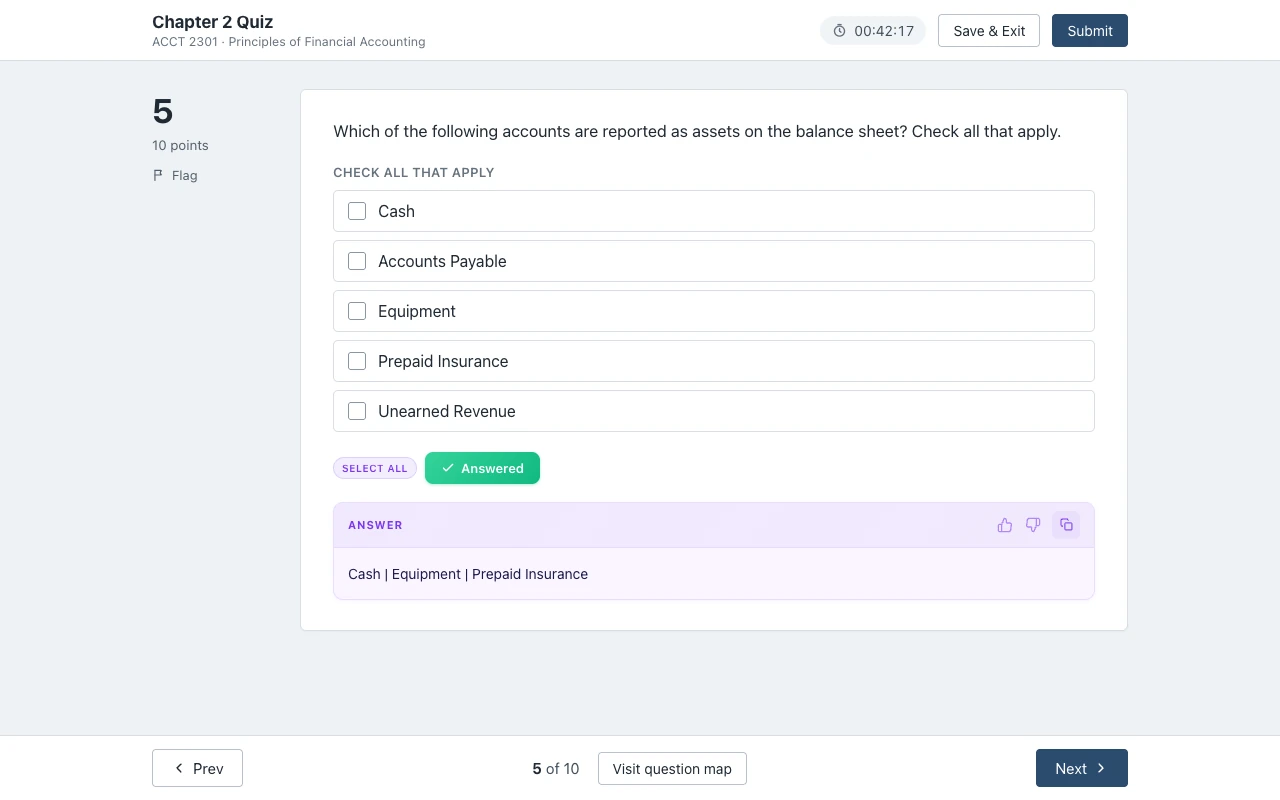
See every supported question type on the McGraw Hill page.
Sources we checked
- Creating Question Bank Assignments: Policy Settings (McGraw Hill, PDF), checked 2026-10-21
- Assignment Policy Settings and Best Practices (McGraw Hill, PDF), checked 2026-10-21
- Connect - Policy settings for student attempts (McGraw Hill), checked 2026-10-21
- Connect - Resource assistance types (McGraw Hill), checked 2026-10-21
- Connect - Auto Submit In Progress Assignments on Due Date (McGraw Hill), checked 2026-10-21
- Incomplete Connect assignments sync with 0 points in LTI Advantage (McGraw Hill), checked 2026-10-21
- Connect - Deploying Connect Assignment to Canvas (McGraw Hill), checked 2026-10-21
- Connect - Set up and manage the gradebook in Connect (McGraw Hill), checked 2026-10-21
- LMS Integration (McGraw Hill), checked 2026-10-21
- Completing Assignments - Student (McGraw Hill, PDF), checked 2026-10-21
- Creating an Online Exam (McGraw Hill, PDF), checked 2026-10-21
- Student Tips: Take Advantage of McGraw Hill Connect Practice Tests (McGraw Hill blog), checked 2026-10-21
Common questions
Does McGraw Hill Connect take the highest score?
It depends on your instructor. When Connect grades go to Canvas, the instructor picks best, last or average for each assignment. The Connect gradebook, which only some titles have, uses the best attempt by default.
Does Check my work count against you?
Only if your instructor set a deduction. McGraw Hill says a Check my work deduction is applied once per question, and the instructor can also limit how many times you check.
What is the late penalty on McGraw Hill Connect?
Your instructor sets it: a one-time penalty, a percent per hour or per day, or none. McGraw Hill says hourly deductions start five minutes after the due time, and Connect does not notify you of them.
Will McGraw Hill save my progress?
Yes, with Save and Exit, if the assignment is not timed. On a timed assignment the clock keeps running after Save and Exit. Saving is not submitting, so click Submit when you finish.
Does McGraw Hill track time?
Yes. McGraw Hill says your Results page shows the time on task for each attempt, and instructor reports show total time spent on each assignment.
Why did Canvas give me a 0 for a Connect assignment?
With LTI Advantage, McGraw Hill sends a 0 to your LMS after the due date for anything not submitted. If the 0 looks wrong, ask your instructor to re-sync: the McGraw Hill LTI Advantage tool can re-sync one student or one assignment.
Does Connect give partial credit?
McGraw Hill does not document partial credit rules in the guides we checked. It does document tolerances that accept a wider range of fill in the blank and numeric answers, and a completion credit setting.
See the answer before you spend an attempt
The answer shows under the Connect question you are on. You pick it, you submit it. Start free.